Runner
Revision | Date | Description |
|---|---|---|
| 24.07.2024 | Init Changelog |
Introduction
Gitlab Runner is a separate application that works with Gitlab CI/CD to run jobs in a pipeline.
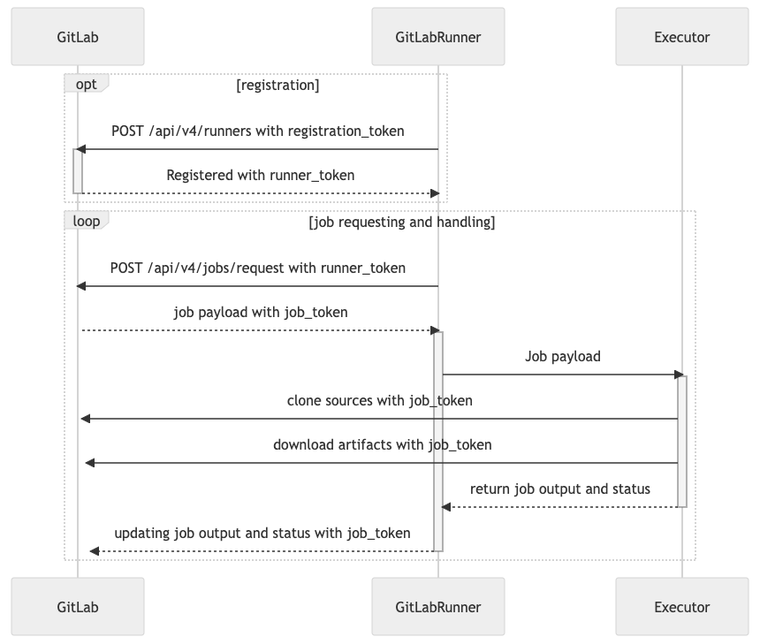
Runner execution flow
This diagram shows how runners are registered and handled.
Deployment
Autopay
All Gitlab Runner instances, managed by DevNetOps Team, are deployed as Helm Chart on AWS EKS cluster.
The Current setup is located on:
Attribute | Value |
|---|---|
Account |
|
K8s Cluster |
|
Namespace |
|
All deployments are managed by GitOps - FluxCD (see repository).
Deployed Runners
Name | Executor | Arch | Tags |
|---|---|---|---|
| Kubernetes |
| |
| Kubernetes |
|
|
Dedicated Node Group
Some deployments run on dedicated Node Groups. Look at table below to see details.
Gitlab Runner | Node Groups | Taints | NodeSelector |
|---|---|---|---|
|
|
|
|
|
|
|
|
Configuration
Deployed Gitlab Runners gets their configuration from Helm Chart values.yaml. If you want to see current config or modify it - check YAML files in the repository.
To see available options, check default values.yaml for Helm Release options and Advanced configuration (official docs) for config.toml entries.
Maintenance
Install
Add the Gitlab Helm repository:
helm repo add gitlab https://charts.gitlab.ioIf you are unable to access to the latest versions of GitLab Runner, you should update the chart. To update the chart, run:
helm repo update gitlabTo view a list of GitLab Runner versions you have access to, run:
helm search repo -l gitlab/gitlab-runnerOnce you have configured Gitlab Runner in your
values.yamlfile, run the following:helm install --namespace NAMESPACE gitlab-runner -f CONFIG_VALUES_FILE gitlab/gitlab-runnerWhere:
NAMESPACEis the Kubernetes namespace where you want to install the GitLab Runner.CONFIG_VALUES_FILEis the path to values file containing your custom configuration. See the Configuring GitLab Runner using the Helm Chart section to create it.
If you want to install a specific version of GitLab Runner Helm Chart, add --version RUNNER_HELM_CHART_VERSION to your helm install command. You can install any version of the chart this way, however more recent values.yml may not work with an older version of the chart.
Download the binary for your system:
For Intel-based systems:
sudo curl --output /usr/local/bin/gitlab-runner "https://gitlab-runner-downloads.s3.amazonaws.com/latest/binaries/gitlab-runner-darwin-amd64"For Apple Silicon-based systems:
sudo curl --output /usr/local/bin/gitlab-runner "https://gitlab-runner-downloads.s3.amazonaws.com/latest/binaries/gitlab-runner-darwin-arm64"
Give it permissions to execute:
sudo chmod +x /usr/local/bin/gitlab-runnerAs the user who will run the runners:
Register a runner. When you build iOS or macOS applications on macOS, use the shell executor. Jobs will run directly on the host and use the identity of the logged-in user. The jobs will not run in a container, which is less secure than using container executors. For details, see the security implications documentation.
Open a terminal and switch to the current user.
su - USERNAMEInstall GitLab Runner as a service and start it:
cd ~ gitlab-runner install gitlab-runner start
Reboot your system.
If you followed these instructions, the GitLab Runner configuration file (config.toml) is in /Users/USERNAME/.gitlab-runner/. Learn more about configuring runners.
Update
Before upgrading GitLab Runner, pause the runner in GitLab and ensure any jobs have completed. Pausing the runner prevents problems arising with the jobs, such as authorization errors when they complete.
Once your GitLab Runner Chart is installed, configuration changes and chart updates should be done using helm upgrade:
Where:
NAMESPACEis the Kubernetes namespace where GitLab Runner is installed.CONFIG_VALUES_FILEis the path to values file containing your custom configuration. See the Configuring GitLab Runner using the Helm Chart section to create it.RELEASE-NAMEis the name you gave the chart when installing it. In the Installing GitLab Runner using the Helm Chart section, we called it gitlab-runner.
If you want to update to a specific version of GitLab Runner Helm Chart instead of the latest one, add --version RUNNER_HELM_CHART_VERSION to your helm upgrade command.
Stop the service:
gitlab-runner stopDownload the binary to replace the GitLab Runner executable:
For Intel-based systems:
sudo curl -o /usr/local/bin/gitlab-runner "https://gitlab-runner-downloads.s3.amazonaws.com/latest/binaries/gitlab-runner-darwin-amd64"For Apple Silicon-based systems:
sudo curl -o /usr/local/bin/gitlab-runner "https://gitlab-runner-downloads.s3.amazonaws.com/latest/binaries/gitlab-runner-darwin-arm64"
Give it permissions to execute:
sudo chmod +x /usr/local/bin/gitlab-runnerStart the service:
gitlab-runner start