LLD002-005 - Next-generation Firewall
Introduction
Purpose
The purpose of this document is to describe a low-level design for the implementation of a Fortinet NGFW in our Amazon Web Services (AWS) environment. The design will cover the specifics of how the NGFW will be integrated into our existing infrastructure, including the placement of the firewall, the network flows to and from the firewall, and the relevant security policies.
Changelog
Revision | Date | Description |
|---|---|---|
| 10.07.2024 | Initial document |
Related documents
HLD002 - Combined Network Model
Background
As our organization moves more resources and services to the cloud, ensuring robust security measures is crucial. Traditional firewall technologies have proven insufficient due to their lack of understanding of applications, users, and content. To address this challenge, we are implementing Fortinet’s Next-Generation Firewall(NGFW). The Fortinet NGFW is designed to detect and block sophisticated threats with advanced security algorithms while offering granular visibility of our network traffic.
Architecture diagrams
Explanation
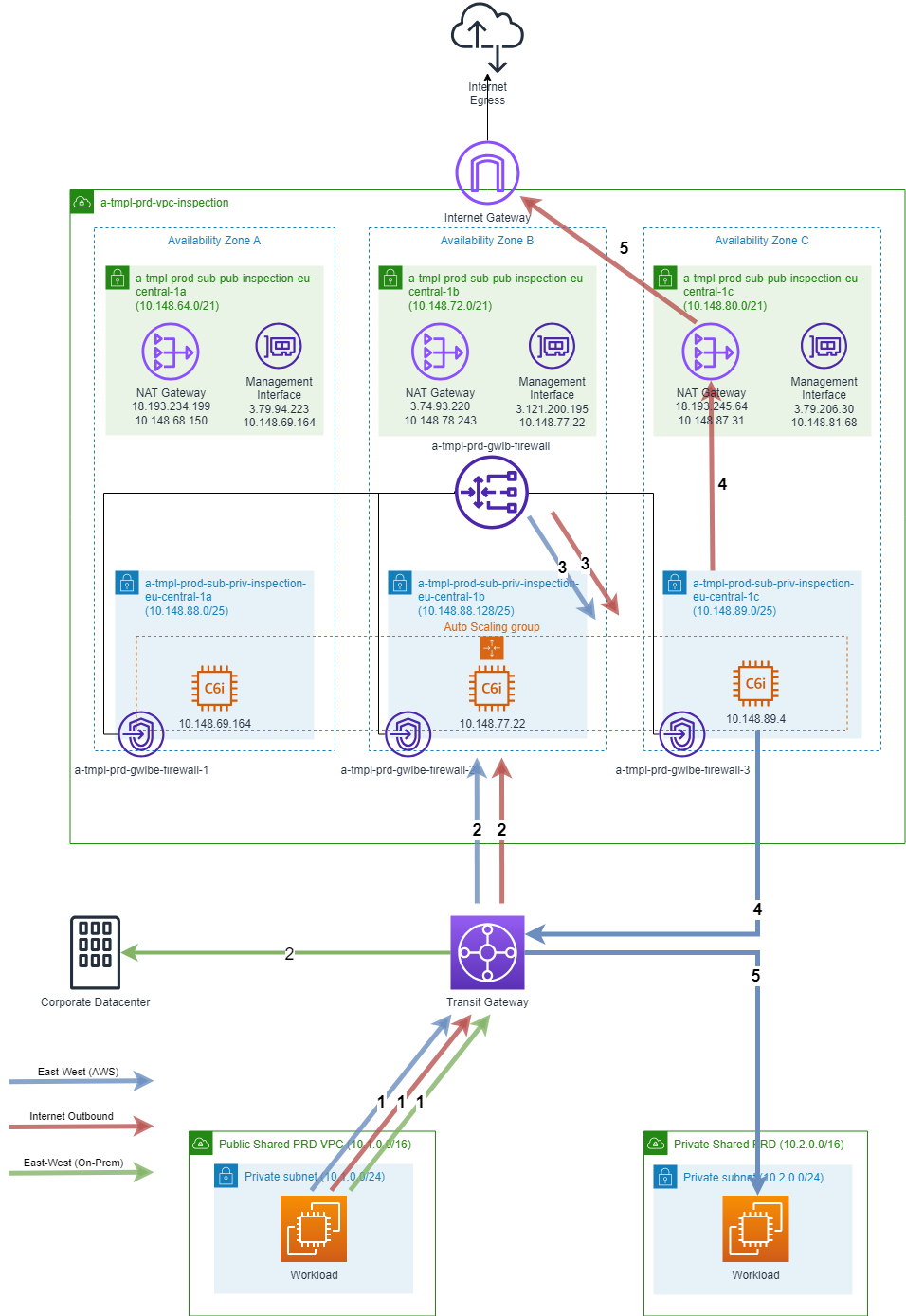
The diagram represents an architecture for inspecting and filtering network traffic using firewalls in a scalable and highly available manner.
Public VPC: This is a Virtual Private Cloud (VPC) that contains resources that need to be publicly accessible. It can include services like web servers, APIs, or other applications exposed to the internet.
Private VPC: This VPC houses sensitive or internal resources that should not be directly accessible from the internet. Examples include databases, internal application servers, or backend services.
Transit Gateway: The Transit Gateway serves as a central hub for connecting multiple VPCs and VPN connections. It allows traffic to flow between the Public and Private VPCs securely and efficiently.
Gateway Load Balancer: The Gateway Load Balancer acts as the entry point for incoming traffic that needs to be inspected. It distributes the traffic across multiple instances of Firewall, ensuring scalability, high availability, and fault tolerance. The Gateway Load Balancer operates at the network layer and can handle TCP, UDP, and HTTP(S) traffic.
Gateway Load Balancer Endpoints: GWLB Endpoints receives and forwards traffic to Gateway Load Balancer
Firewall Instances: These are instances running firewall software, responsible for inspecting and filtering incoming and outgoing network traffic. They provide enhanced security by enforcing specific rules and policies, such as blocking malicious traffic or allowing only authorized connections. The Firewall instances are deployed in an autoscaling group, which automatically scales the number of instances based on demand.
Management VPC: VPC created to manage firewall instances, gather logs and connect external systems.
Management Interface: Network interface attached to Firewall instance.
Network specification
TMPL Network Topology
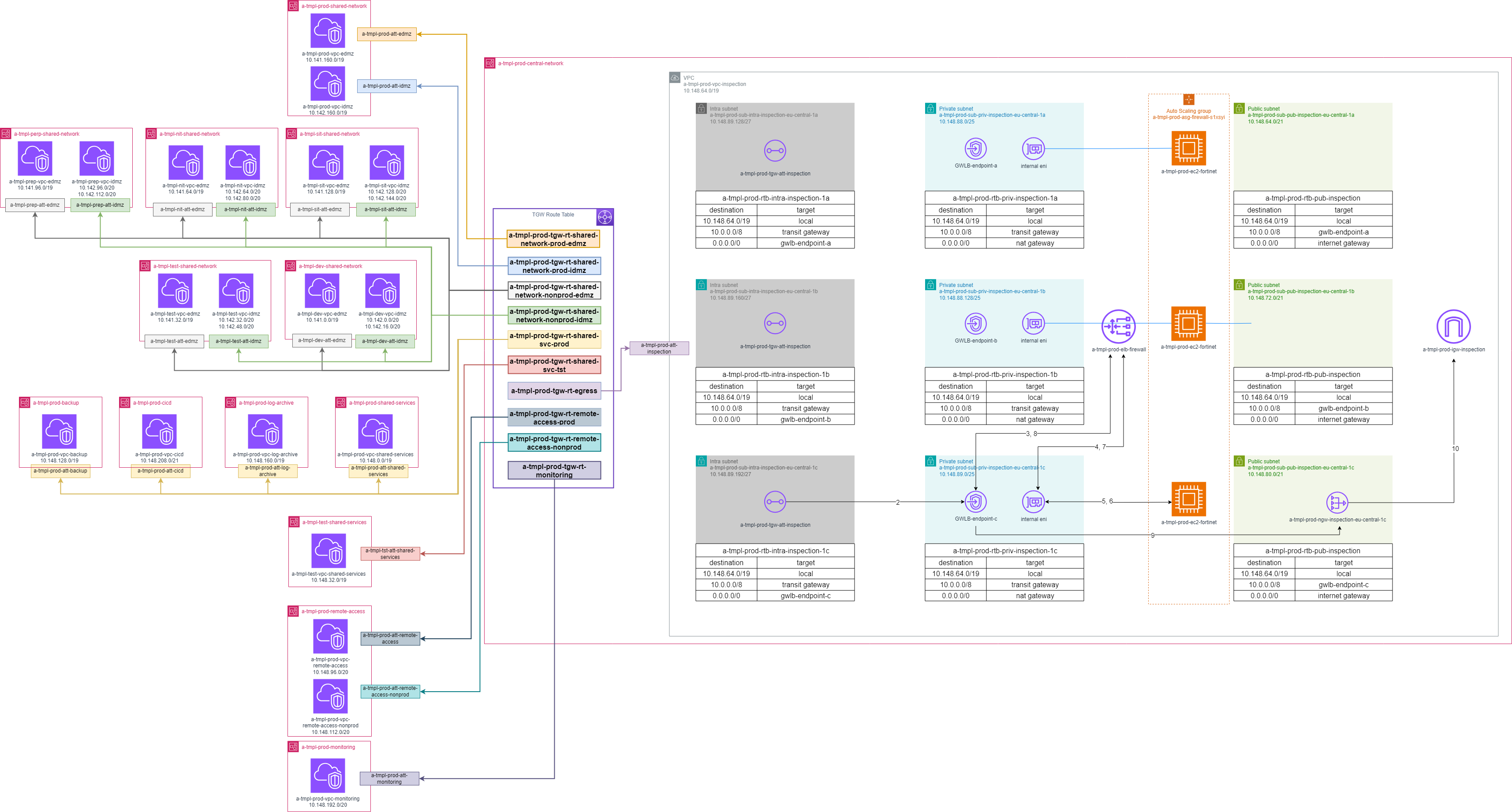
EU-Central-1 network structure and routing tables: LLD002-001 - Intra Region Connection
Direct connect and VPN connection with existing datacenters: LLD002-002 - On Premise <> AWS connectivity
Internet inbound: LLD002-003 - Ingress and WAF
Connection scenarios
Egress to the Internet
When a workload in either the Public or Private VPC wants to access the internet, the traffic flow is as follows:
The workload sends the traffic to the Transit Gateway (TGW).
The TGW routes the traffic to the Gateway Load Balancer Endpoints.
The GWLB acts as the egress point and forwards the traffic to the Firewall instances, where the Firewall instances inspect and filter the outgoing traffic based on the configured rules and policies.
If the traffic is allowed, it proceeds to the Internet Gateway (IGW), which provides connectivity to the internet.
East-West traffic to on-premises
When a workload in either the Public or Private VPC needs to communicate with resources in an on-premises network, the traffic flow is as follows:
The workload sends the traffic to the TGW.
The TGW routes the traffic to the appropriate on-premises resources through Direct connect or Site-to-site VPN, allowing communication between the VPC and on-premises network.
East-West traffic within AWS
When a workload in the Public VPC needs to communicate with a workload in the Private VPC within AWS, the traffic flow and inspection process are as follows:
The public workload sends the traffic to the Transit Gateway (TGW).
The TGW routes the traffic to the Gateway Load Balancer Endpoints.
The GWLB acts as the ingress point and forwards the traffic to the Firewall instances, where the Firewall instances inspect and filter the incoming traffic based on the configured rules and policies.
If the traffic is allowed, traffic is forwarded to TGW.
The TGW routes the traffic to the destination workload in the Private VPC.
Integration
On-prem > Tardis StarGate > EKS
EKS > Tardis Stargate > On-prem
EKS iDMZ > Tardis StarGate > Lambda(and others) iDMZ
EKS eDMZ > NGF>Tardis StarGate > EKS iDMZ
EKS eDMZ > Tardis StarGate > Lambda(and others) eDMZ
EKS iDMZ > Tardis StarGate > Lambda(and others) eDMZ
Implementation Details
Launch Configuration:
Create a Launch Configuration
a-tmpl-prd-lc-firewall. Specify thec6i.xlargeinstance type, the desired AMI from AWS Marketplace Fortinet FortiGate (BYOL) Next-Generation Firewall, and any additional configuration settings.
Autoscaling Group:
Create an Autoscaling Group
a-tmpl-prd-asg-firewallthat utilizes the Launch Configuration created in the previous step.Set the desired minimum and maximum number of instances to 3.
Configure Security Groups:
Create a security group a-tmpl-prd-sg-firewall specifically for the Firewall instances.
Configure inbound rules with a source
0.0.0.0/0for all trafficConfigure outbound rules with a destination
0.0.0.0/0for all traffic
Set Up Gateway Load Balancer (GWLB):
Create and configure the Gateway Load Balancer
a-tmpl-prd-gwlb-firewallas the entry point for incoming traffic.Attach the Autoscaling Group to the GWLB target group to enable load balancing across the instances in the Autoscaling Group.
Create Gateway Load Balancer Endpoints:
Create Gateway Service
a-tmpl-[env]-vpce-gwlb-firewallper environment(dev/tst/sit/prep/prd).Attach endpoints to previously created GWLB.
Configure connection requests to endpoint service as accepted automatically.
Enable Support for IPv4
Test and Validate:
Validate the architecture by testing the traffic flow and ensuring that the Firewall instances within the Autoscaling Group correctly inspect and filter the traffic.
Monitor the system and review logs generated by the Firewall instances to verify the enforcement of security policies.
Cost Estimation
As it’s difficult to estimate the amount of traffic generated by TMPL applications we can only consider some hypothetical traffic scenario.
Monthly traffic: Approximately 1 million incoming requests per day (30 million requests per month).
Average request size: 10 KB.
Outbound traffic: Assume the outbound traffic is 50GB.
Total monthly data transfer: 350 GB (30 million requests * 10 KB + 50GB egress).
Gateway LoadBalancer
3 availability zones x 0.0147 USD x 730 hours in a month = 32.19 USD
Total hourly charges for all Gateway Load Balancers (monthly): 32.19 USD
Load Capacity Units (LCUs)
Total processed bytes: 350 GB per month x 0.00136986 months in an hour = 0.479451 GB per hour
Average number of new connections/flows: 10000 per minute / (60 seconds in a minute) = 166.67 per second
0.479451 GB per hour / 1 GB per hour for EC2 instances, containers and IP addresses as targets. = 0.479451 Processed bytes LCUs
166.67 new connections / 600 new connections per LCU = 0.2777833333333333 new connections/flows LCUs
166.67 new connections x 60 seconds = 10,000.20 active GWLB connections
10,000.20 active connections / 60000 connections per LCU = 0.16667 active GWLB connections LCUs
Max (0.479451 processed bytes LCUs, 0.2777833333333333 new connections/flows LCUs, 0.16667 active connections/flows LCUs) = 0.479451 max GWLB LCUs
0.479451 GWLB LCUs x 0.0042 GWLB LCU price x 730 hours per month = 1.47 USD (Gateway Load Balancer LCU usage)
Total LCU charges for all Gateway Load Balancers (monthly): 1.47 USD
Gateway Load Balancer Endpoint
15 load balancer endpoints x 0.012 USD per hour x 730 hours in a month = 131,4 USD for hourly usage
Total hourly charges for all Gateway Load Balancer Endpoints (monthly): 131,4 USD
0.479451 GB per hour x 0.0035 USD per GB x 730 hours in a month = 1.22 USD for GBs processed
Total data transfer charges for all Gateway Load Balancer Endpoints (monthly): 1.22 USD
131.4 USD + 1.22 USD = 132.62 USD
Total charges for all Gateway Load Balancer Endpoints (monthly): 132.62 USD
EC2 Instances
3 instances x 0.194 USD On Demand hourly cost x 730 hours in a month = 424.86 USD
On-Demand instances (monthly): 424.86 USD
Calculation does not include License cost
Expected Outcomes
Enhanced network security by inspecting traffic at the perimeter and within the Inspection VPC.
Scalability and high availability due to the use of autoscaling groups and load balancing.
Improved performance and reduced latency through efficient load balancing and traffic distribution.
Visibility into network traffic patterns, security events, and anomalies through logging and analytics integration.