LLD002-003 - Ingress and WAF
Introduction
Purpose
This document outlines a low-level design for Internet ingress and Web Application Firewall (WAF) implementation in an Amazon Web Services (AWS) environment.
Changelog
Revision | Date | Description |
|---|---|---|
| 10.07.2024 | Initial document |
Related documents
HLD002 - Combined Network Model
Background
Addressing the critical need for robust security in cloud-based infrastructure, this design integrates AWS's advanced networking components and WAF capabilities. The focus is on ensuring secure, scalable protection for Internet-facing applications from common web threats and vulnerabilities, leveraging AWS’s infrastructure. This background provides a foundation for detailing the strategic deployment and management of these technologies to enhance the security and efficiency of web applications on AWS.
Internet Ingress
Architecture diagram
Description
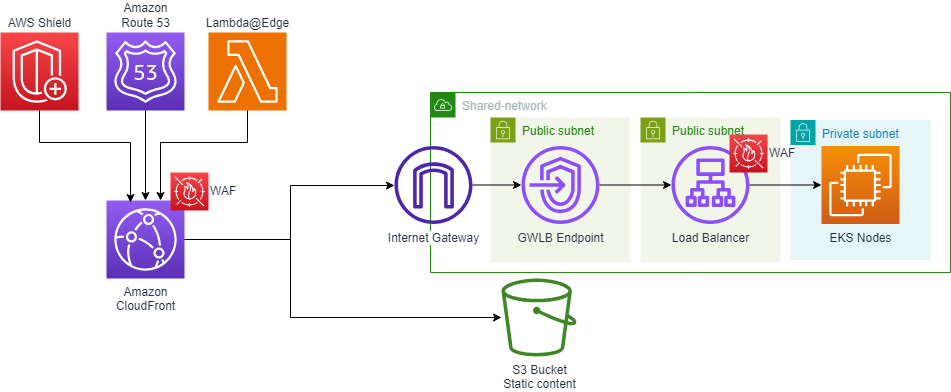
In our ingress architecture, we employ a shared Virtual Private Cloud (VPC) model within our AWS environment, specifically designed for enhanced security and efficient network management. This architecture is implemented across shared-network accounts, each containing two distinct types of VPCs: the Internal Demilitarized Zone (iDMZ) and the External Demilitarized Zone (eDMZ).
Shared VPCs in Shared-Network Accounts
Our architecture utilizes shared VPCs that are centrally created and managed in shared-network accounts. This approach promotes better resource sharing and isolation between different organizational units.
eDMZ VPC
These VPCs are tailored for internet-facing applications. They are equipped to handle external traffic, providing a secure environment for publicly accessible services.
Internet Gateway in eDMZ VPCs
Each eDMZ VPC is equipped with its own Internet Gateway (IGW). The IGW serves as the critical junction point for all incoming internet traffic, ensuring a controlled and secure entry point into our network.
Routing and Packet Inspection
Traffic routing through the IGW in eDMZ VPCs is meticulously managed. All inbound traffic from the IGW is directed towards a Gateway Load Balancer (GWLB) endpoint. The GWLB plays a pivotal role in the inspection of packets. Before the traffic reaches the application layer, it undergoes thorough scrutiny for potential security threats or anomalies via a next-generation firewall. This inspection mechanism is crucial for maintaining the integrity and security of our internet-facing applications.
WAF
AWS WAF components
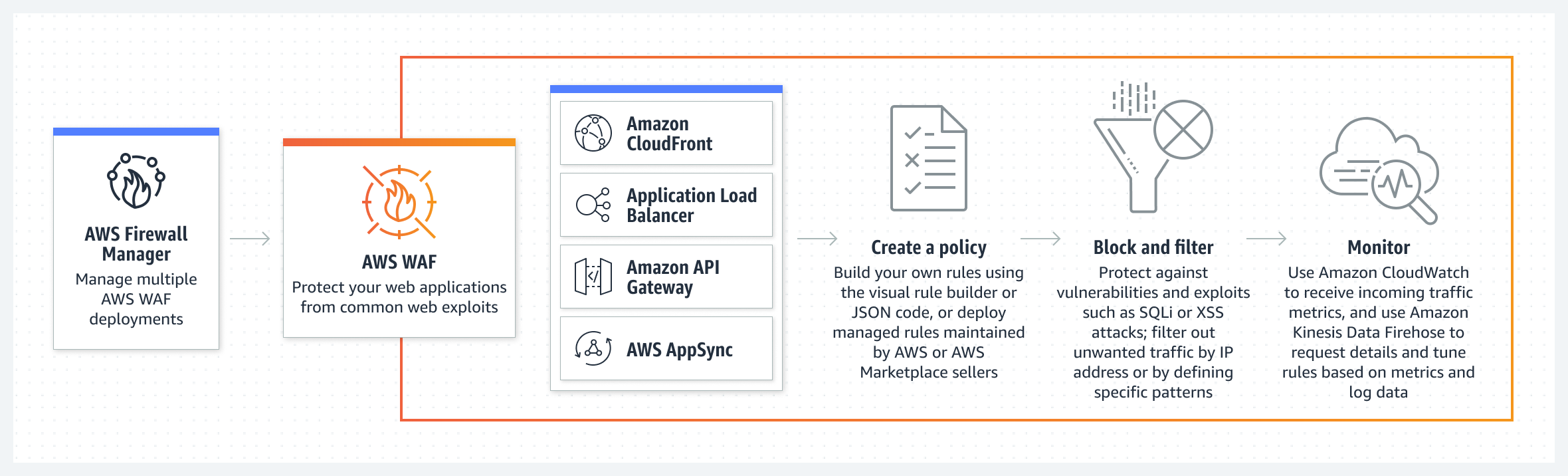
Web ACLs – You use a web access control list (ACL) to protect a set of AWS resources. You create a web ACL and define its protection strategy by adding rules. Rules define criteria for inspecting web requests and they specify the action to take on requests that match their criteria.
Rules – Each rule contains a statement that defines the inspection criteria, and an action to take if a web request meets the criteria. When a web request meets the criteria, that's a match. You can configure rules to block matching requests, allow them through, count them, or run bot controls against them that use CAPTCHA puzzles or silent client browser challenges.
Rule groups – You can define rules directly inside a web ACL or in reusable rule groups. AWS Managed Rules and AWS Marketplace sellers provide managed rule groups for your use. You can also define your own rule groups.
AWS WAF protects the following resource types
Amazon API Gateway REST API
Application Load Balancer
AWS AppSync GraphQL API
Amazon Cognito user pool
AWS App Runner service
CloudFront distributions, but you must use the Region US East (N. Virginia) to create web ACL
General AWS WAF managed rule groups
Core rule set:
to protect against exploitation of a wide range of vulnerabilities, including some of the high risk and commonly occurring vulnerabilities described in OWASP publications
Known bad inputs:
to block request patterns that are known to be invalid and are associated with exploitation or discovery of vulnerabilities.
Admin protection:
to protect against access to the administrator panel
SQL database protection:
SQL database managed rule group - to protects against remote injection of unauthorized queries
Linux protection:
Linux operating system managed rule group - to protect against Linux-specific Local File Inclusion
POSIX operating system managed rule group - to protect against command injection, LFI, and path traversal
For application using PHP:
PHP application managed rule group - to protect against PHP script code injection
Amazon IP reputation list managed rule group - to block IP addresses typically associated with bots or other threats (based on Amazon internal threat intelligence)
Custom rules and rule groups
GEO Match: to block request from specific countries
Byte Match: to block request with specific string in
body/method/query_string/single_header/single_query_argument/uri_pathRegex Pattern Set Reference: to block request matching regex patterns in
body/method/query_string/single_header/single_query_argument/uri_pathIP Set Reference: to block request from specific IP addresses
Architecture diagram
Implementation details
Creating eDMZ VPCs:
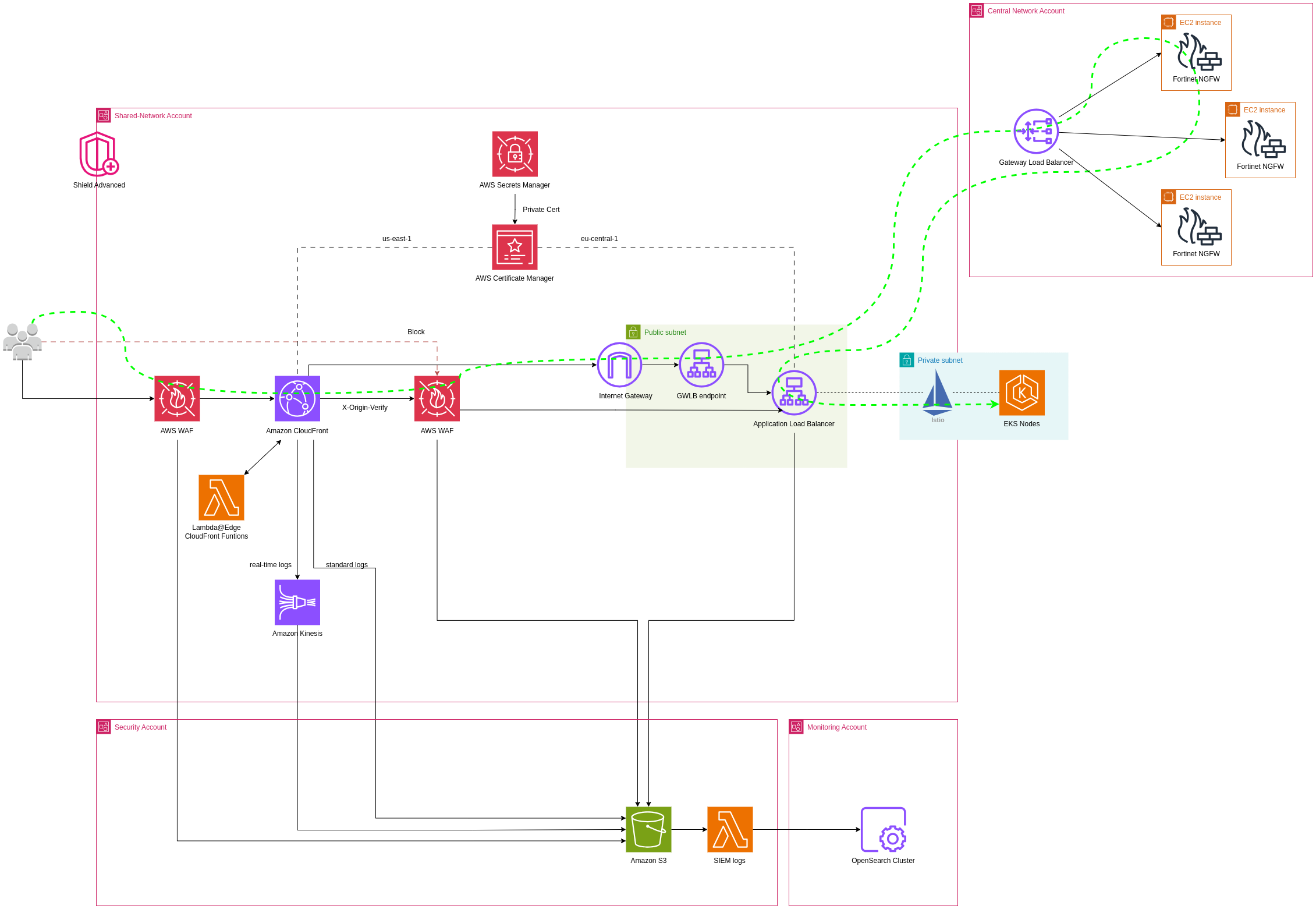
In each shared-network account, create an eDMZ (External DMZ) VPC configured with appropriate CIDR blocks, ensuring no overlap with other VPCs.
Configuring Internet Gateways for eDMZ VPCs:
Attach an Internet Gateway (IGW) to each eDMZ VPC to handle incoming internet traffic.
Setting Up Gateway Load Balancer (GWLB) Endpoints:
Deploy GWLB endpoints in the eDMZ VPCs for initial traffic inspection.
Configure the route tables to direct incoming traffic from the IGW to the GWLB endpoints.
0.0.0.0/0→gwlbe-id
Integrating CloudFront for Content Delivery:
Set up Amazon CloudFront distributions for the web applications. CloudFront will serve as the global content delivery network (CDN) to improve the performance and availability of the applications.
Associate the WAF with CloudFront distributions to apply the security rules at the CDN level, providing an additional layer of protection against attacks.
Implementing AWS WAF:
Configure AWS WAF on Application LoadBalancer to drop incoming connections from outside CloudFront distribution using ACL
Configure AWS WAF to protect the web applications against common web exploits on CloudFront distribution.
Create and configure default WAF rules based on your organization's standard.
Modify web ACLs (Access Control Lists) based on the specific security requirements of the applications.
Using Lambda@Edge or CloudFront functions for Customized Processing:
Implement Lambda@Edge functions to handle specific tasks like URL rewrites, header manipulations, or access control decisions at the edge locations.
Integrate these Lambda functions with CloudFront to execute in response to CloudFront events.
Monitoring, Logging, and Compliance:
Pricing
Because the resources will be already protected under AWS Shield Advanced, there are no additional charges for AWS WAF web ACL, rule or request fees
Lambda@Edge:
Requests - $0.60 per 1M requests
Duration - $0.00005001 for every GB-second
CloudFront functions:
Requests: $0.10 per 1M requests
Expected Outcomes
Implementation of AWS WAF on Cloudfront and Load Balancers.