HLD010 - Cost Management
Introduction
Purpose
The purpose of this document is to declare and describe tools used for cost management.
Changelog
Revision | Date | Description |
|---|---|---|
| 23.07.2024 | Initial document |
Related documents
LLD010-001 - AWS Budgets
Background
When working with AWS organization shall remember the shared responsibility model in which customer assumes responsibility and management of the services running. Two main factors to be considered based on that are security and costs. This document is focused on the cost area and the tools to be used to avoid unexpected expenses. In short AWS Billing allows us to organize costs already billed while AWS Cost Management provides tools for optimization of future costs. Both services are closely integrated.
Additional tools that will be used are Infracost which allows to see cost of infrastructure before deploying it via Terraform and Kube-cost which helps optimising cost on Kubernetes clusters.
Implementation Details
AWS Budgets will be as a main tool to control expanses across AWS Accounts. It tracks the spendings and sends alerts when cost exceeds specified thresholds.
Budgets are set separately for each of the accounts, at the beginning for already existing account alarm threshold will be set up based on current spendings, for new accounts it will be $50. All the values will be updated after some times to fit current usage.
After the Alarm is triggered the notification emails will be sent to mailing list defined in notification settings.
Few extra services which will be used to manage costs:
Service | Pricing | Additional notes |
|---|---|---|
AWS Cost Explorer | Using Cost Explorer in AWS Console if free. Each request to Cost Explorer API will incur a cost of $0.01. | entry point when it comes to cost analysis |
AWS Consolidated Billing | Free | Already implemented |
AWS Cost Allocation Tags | Free | tags are widely used on infrastructure so this brings another benefit |
AWS Cost Anomaly Detection | Free | It provides protection from unplanned costs by comparing the usage of services in time or seeking for activities like abnormal autoscaling. |
AWS Budgets | It’s free unless using actions. First two action-enabled budgets are free, each subsequent action-enabled budget will incur a $0.10 daily cost. | We will start on base value ($100) which will be fixed based on usage. Notification will be sent to mailing list. |
Saving Plans and Reserved instances | Free, pay for resources. | To be considered based on usage. |
AWS Cost Management
AWS Cost Management console features are designed to help users optimize future costs.
With the AWS Cost Management console and the Billing console, you can do the following tasks:
Use cases | Description | AWS Cost Management feature names | Billing Console feature names |
|---|---|---|---|
Organize | Construct your cost allocation and governance foundation with your own tagging strategy. | - | |
Report | Raise awareness and accountability of your cloud spend with the detailed, allocable cost data. | ||
Access | Track billing information across the organization in a consolidated view. | - | |
Control | Establish effective governance mechanisms with the right guardrails in place. | - | |
Forecast | Estimate your resource utilization and spend with forecast dashboards that you create. | - | |
Budget | Keep your spend in check with custom budget threshold and auto alert notification. | - | |
Purchase | Leverage free trials and programmatic discounts based on your workload pattern and needs. | ||
Rightsize | Align your service allocation size to your actual workload demand. | - | |
Inspect | Stay up-to-date with your resource deployment and cost optimization opportunities. | - |
Infracost tool
Infracost will be used to provide insight about possible expenses when deploying infrastructure. It allows to prognose cost of Terraform code deployment but it can be used as a guardrail for feature deployment. It can be integrated directly with Jira to bring that view into project management.
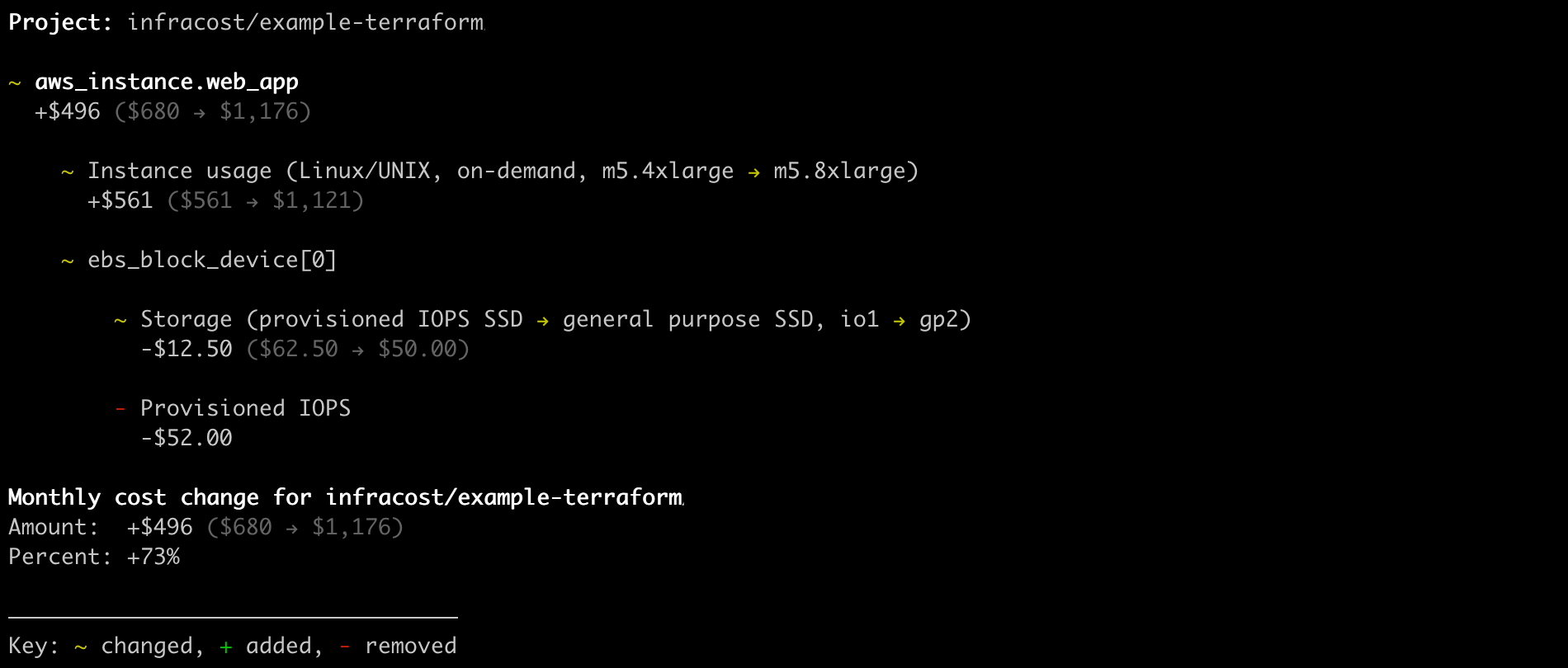
Cost differences shown for a change in Terraform deployment.
Infracost can also easily integrate into CI/CD system to provide differences in cost between deployments.
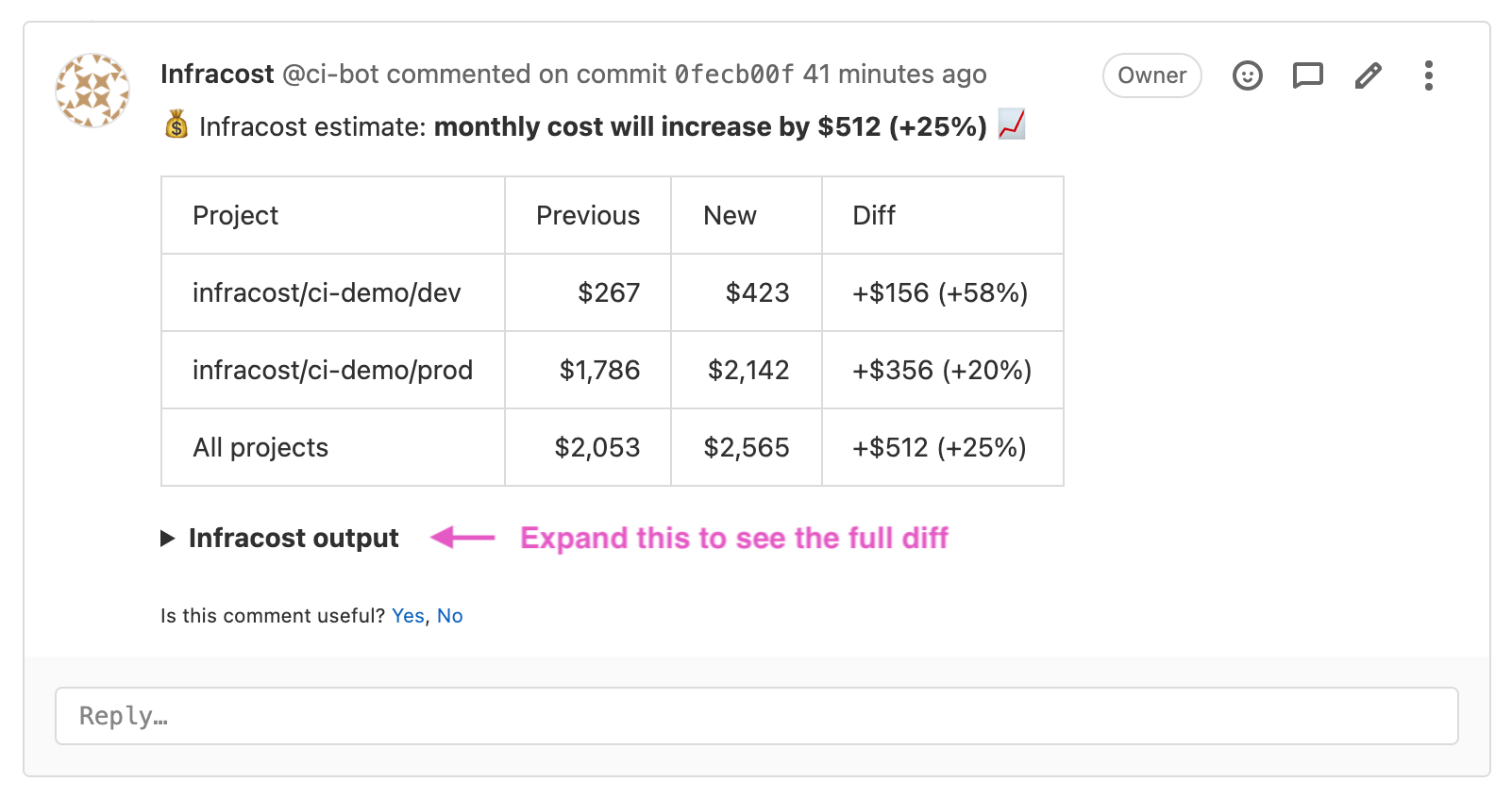
Infracost Cloud licence version is recommended to receive additional trails, cost dashboards, Jira integration. With $50/month cost per seat (which is based on unique Pull Request authors) number of users will vary, but a free trial option is available to determine the exact number. Infracost can provide a script for running on repositories to help count the required number of seats as well.
Source: https://www.infracost.io/pricing/
Infracost CI/CD integration with Gitlab CI is described at https://gitlab.com/infracost/infracost-gitlab-ci
Kube-cost tool
Kube-cost will be used to provide real-time cost visibility and insights about possible optimisations within EKS cluster. It allows to break down cost by each component of the stack, provide insights on cost optimisation and send alerts whenever certain thresholds are met.
This plugin is described in detail in EKS Plugins section.

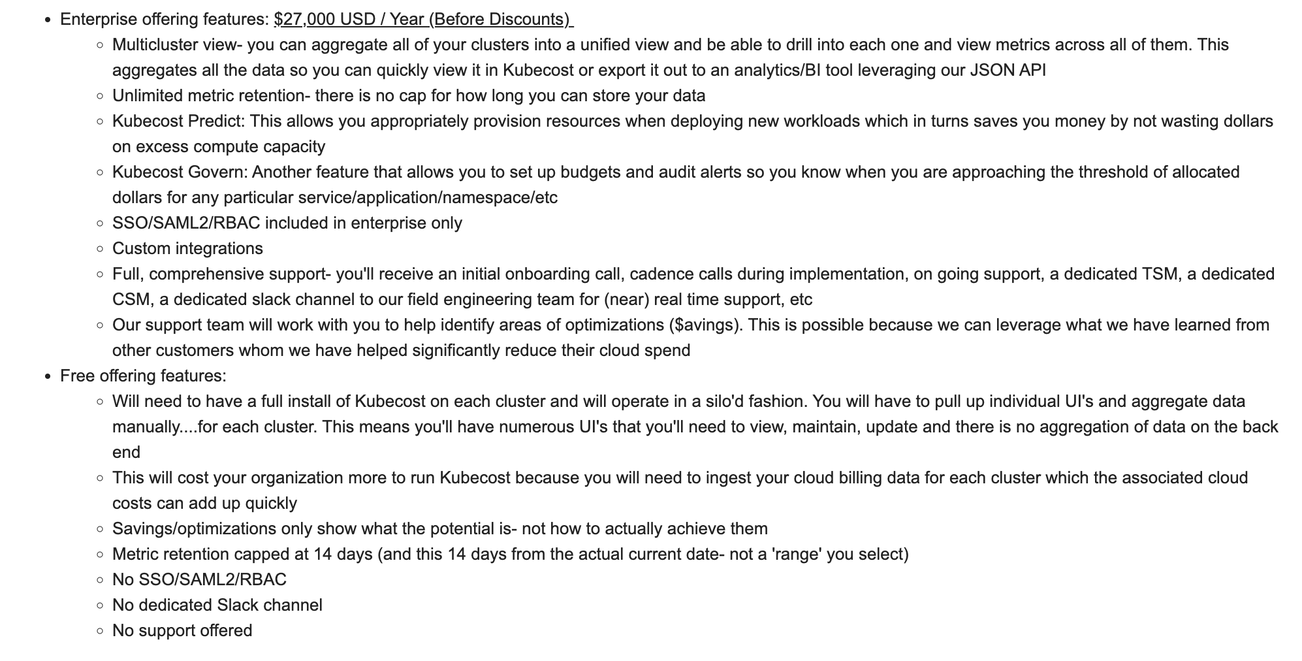
Kube-cost Enterprise license version would be recommended for unlimited metric retention, introduction of budgets, alerts & notifications, reporting & enterprise support plan.
But since there is no cost information available in public, we’ve contacted Kubecost for some details - basted on this we can assume Kubecost free will be selected, at least initially - details below: