HLD006 - Backup
Introduction
Purpose
This high-level design document provides an overview of the AWS Backup solution. The primary goal is to ensure that the solution is secure, compliant and following industry best practices.
Changelog
Revision | Date | Description |
|---|---|---|
| 23.07.2024 | Initial document |
Background
AWS Backup is a fully-managed service that makes it easy to centralize and automate data protection across AWS services, in the cloud, and on-premises. Using this service, you can configure backup policies and monitor activity for your AWS resources in one place. It allows you to automate and consolidate backup tasks previously performed service-by-service and remove the need to create custom scripts and manual processes.
AWS Backup automatically organizes backups across different AWS services and third-party applications in one centralized, encrypted location (backup vault) so that backups of the entire application are managed through a centralized experience, while all the backing up resources must be in the same AWS Region.
With AWS Backup, you can define a central data protection policy called a backup plan that works across AWS services for compute, storage, and databases. The backup plan defines parameters such as backup frequency and backup retention period. Once you define your data protection policies and assign AWS resources to the policies, AWS Backup automates the creation of backups and stores those backups in an encrypted backup vault that you designate. The centralized policies in AWS Backup also help you define access controls and automate backup access management across all your accounts within your AWS Organizations.
High-level architecture
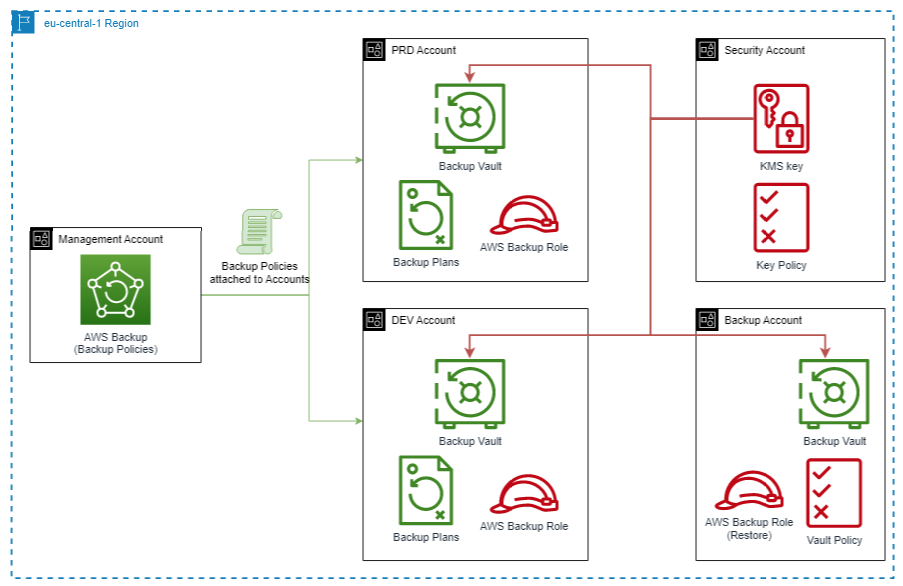
Explanation
AWS Backup creates a snapshot of supported resources (based on the Backup Policy where resource tags, are used to determine which resources shall be backed up).
The snapshot is placed in the backup vault in the Region and account of the backed-up resource.
The snapshot is copied to the Backup AWS Account (and optionally to the different Region).
Supported AWS Services
Amazon Elastic Block Store (EBS) volumes
Amazon EC2 instances (including Windows applications)
AWS CloudFormation stacks
Windows Volume Shadow Copy Service (VSS) supported applications (including Windows Server, Microsoft SQL Server, and Microsoft Exchange Server) on EC2.
Amazon RDS databases (including Amazon Aurora clusters)
Amazon DynamoDB tables, Amazon Elastic File System (EFS) file systems
Amazon FSx for NetApp ONTAP file systems
Amazon FSx for OpenZFS file systems
Amazon FSx for Windows File Server file systems
Amazon FSx for Lustre file systems
Amazon Neptune databases
Amazon DocumentDB (with MongoDB compatibility) databases
AWS Storage Gateway volumes
Amazon S3
VMware CloudTM on AWS and on-premises VMware virtual machines
Amazon Redshift manual snapshot
SAP HANA on EC2
Amazon Timestream databases
Core concepts
Backup plan (backup policy) is a policy expression that defines when and how you want to back up your AWS resources, You assign resources to backup plans and AWS Backup will then automatically make and retain backups for those resources according to the backup plan. Backup plans are composed of one or more backup rules.
Each backup rule is composed of:
a backup schedule, which includes the backup frequency (Recovery Point Objective [RPO]) and backup window;
a lifecycle rule that specifies when to transition a backup from one storage tier to another and when to expire the recovery point;
the backup vault in which to place the created recovery points; and
the tags to be added to backups upon creation.
Backup vault, it’s an encrypted storage location in an AWS account that stores and organizes backups. AWS Backup can set resource-based policies on backup vaults, enabling you to control access to the backup vault and the backups in it
Encryption in backup, for EFS, DynamoDB, S3, Timestream, and VMware virtual machines are encrypted in transit and at rest independently of source services, adding another layer of protection. Encryption is configured at the backup vault level. Backups from other services (EC2, EBS, Amazon FSx, RDS, Aurora, Amazon DocumentDB, Neptune, Storage Gateway) are encrypted using the source service’s backup encryption methodology. For example, EBS snapshots are encrypted using the encryption key of the volume the snapshot was created from.
Cross-Region backup, backups can be copied to multiple different AWS Regions on demand or automatically as part of a scheduled backup plan.
Cross-account management and backup can be managed across all your accounts inside the AWS Organization structure. With cross-account management, you can automatically use backup policies to apply backup plans across the AWS accounts. Backups can also be copied across multiple different accounts.
Incremental backups The first backup of an AWS resource backs up a full copy of your data. For each successive incremental backup, only the changes to your AWS resources are backed up. Incremental backups enable you to benefit from the data protection of frequent backups while minimizing storage costs (backups to cold storage are full backups).
AWS Backup Pricing
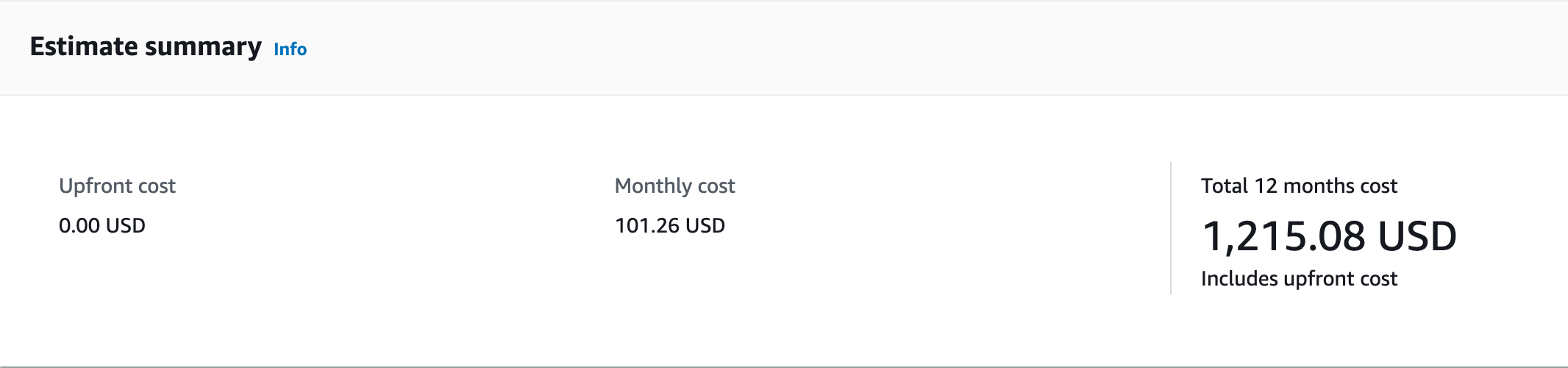
With AWS Backup, pay only for the backup storage you use, backup data transferred between AWS Regions, backup data you restore, and backup evaluations. There is no minimum fee and there are no setup charges.
Here is an example of the cost of the EBS Backup. For easier calculation, we used 1 TB EBS with expected annual growth of 10% and an expected daily change of 2% (as the industry standard) and with 1 Month backup retention period in Frankfurt Region.
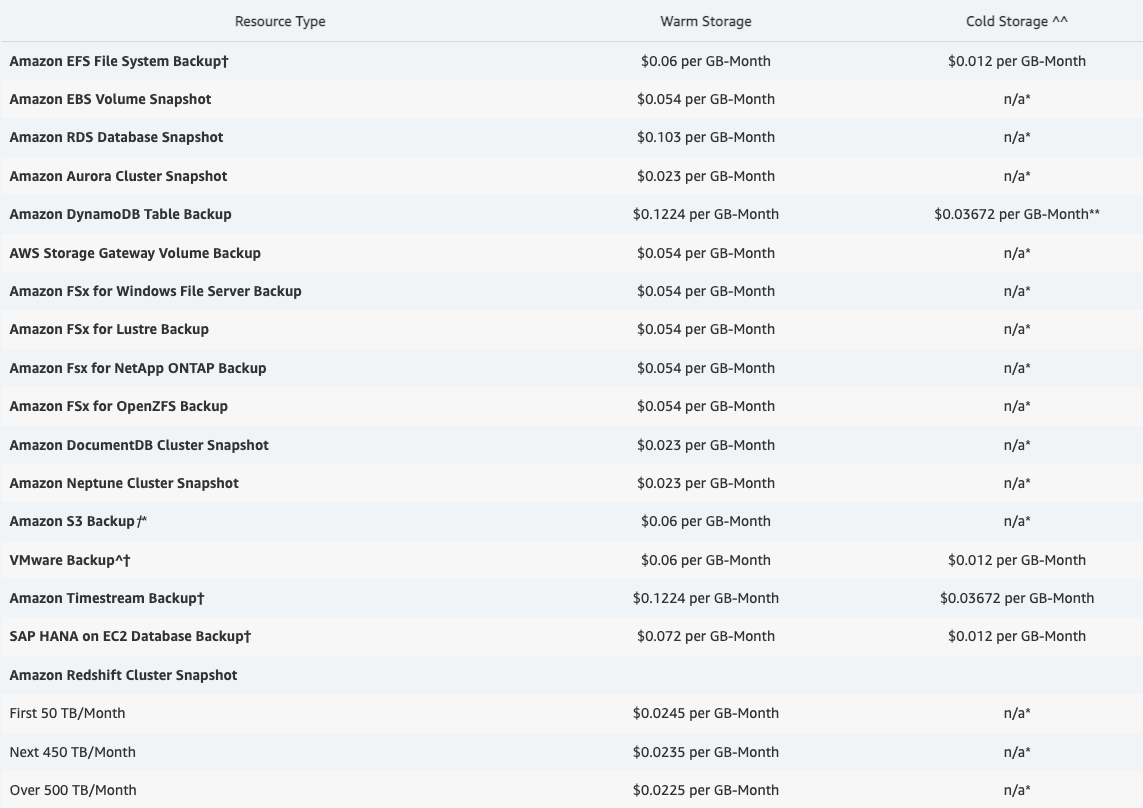
AWS Backup storage pricing
Storage pricing is based on the amount of storage space your backup data consumes. The storage amount billed in a month is based on the average storage space used throughout the month (billed as GB-Month).
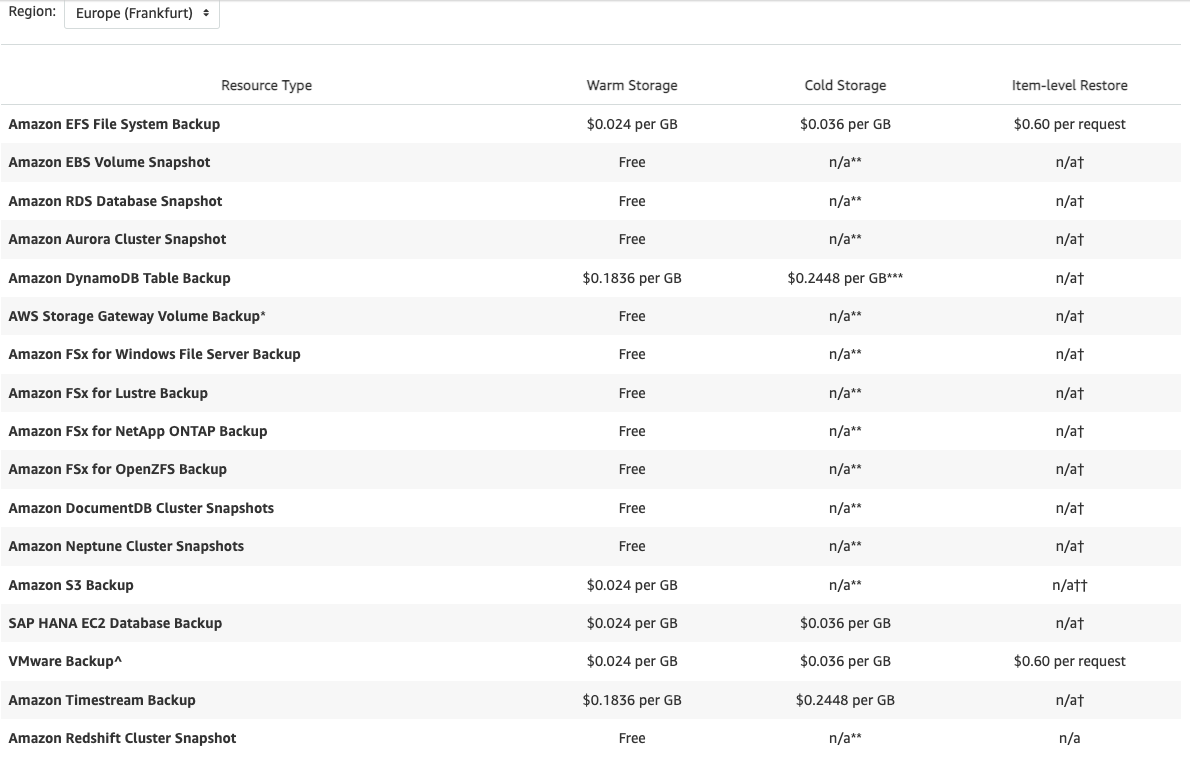
AWS Backup restore pricing
The restore amount billed in a month is based on the amount of data restored for the month. The data restored in a month is measured in GB and represents the sum of the data across all the restores performed in the month.
Implementation Details
Create a separate account dedicated to the AWS Backup service, which will store backups within the environment.
Create a backup plan - a policy that defines when and how to back up your resources.
Assign resources to a backup plan.
Create a backup vault to save and organize groups of backups.
Expected Outcomes
Implementation of AWS Backup solution
Automated backup schedules and retention management