HLD013 - CI/CD CINDYv3
Revision | Date | Description |
|---|---|---|
| 27.08.2024 | Init document |
Introduction
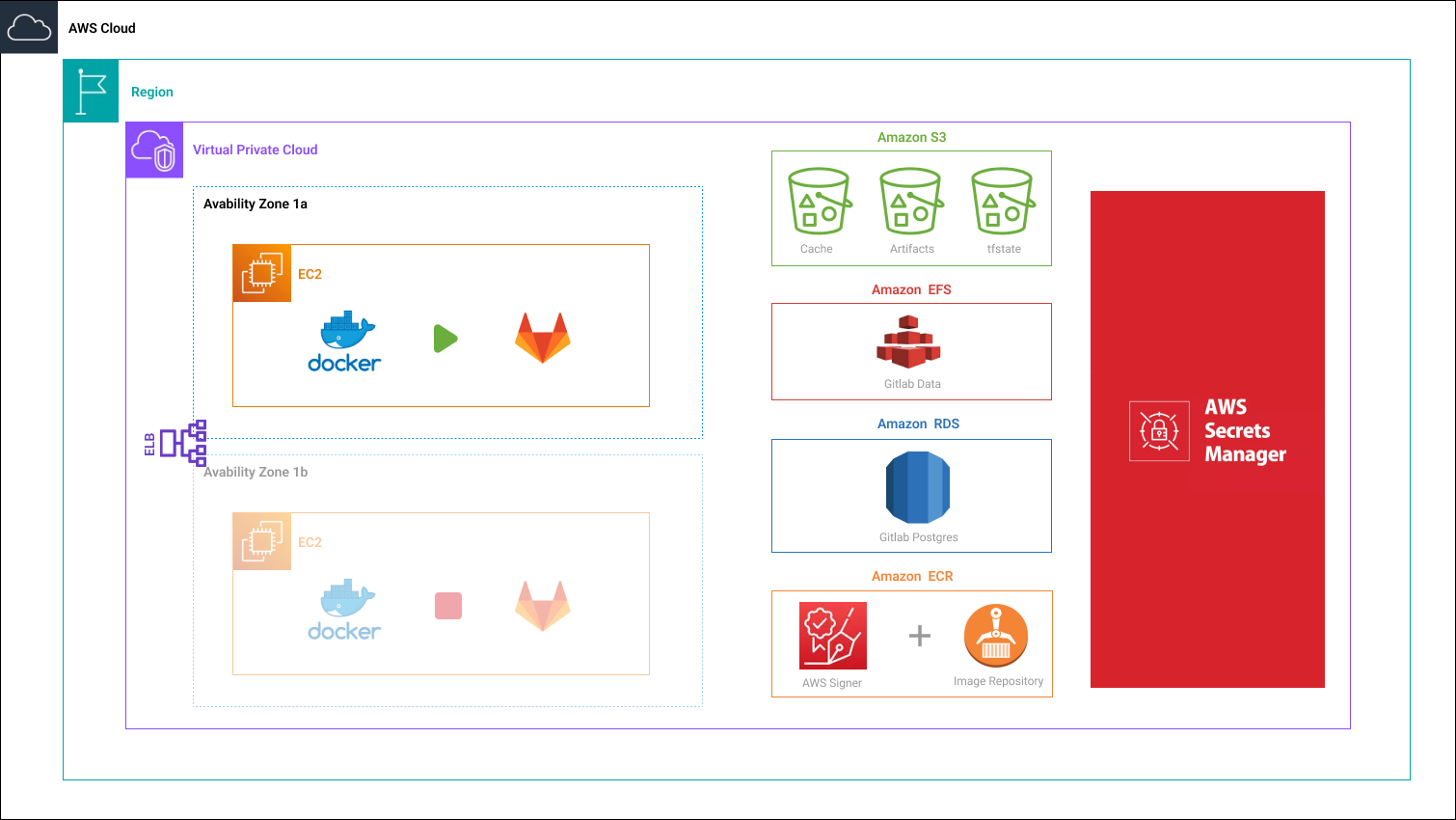
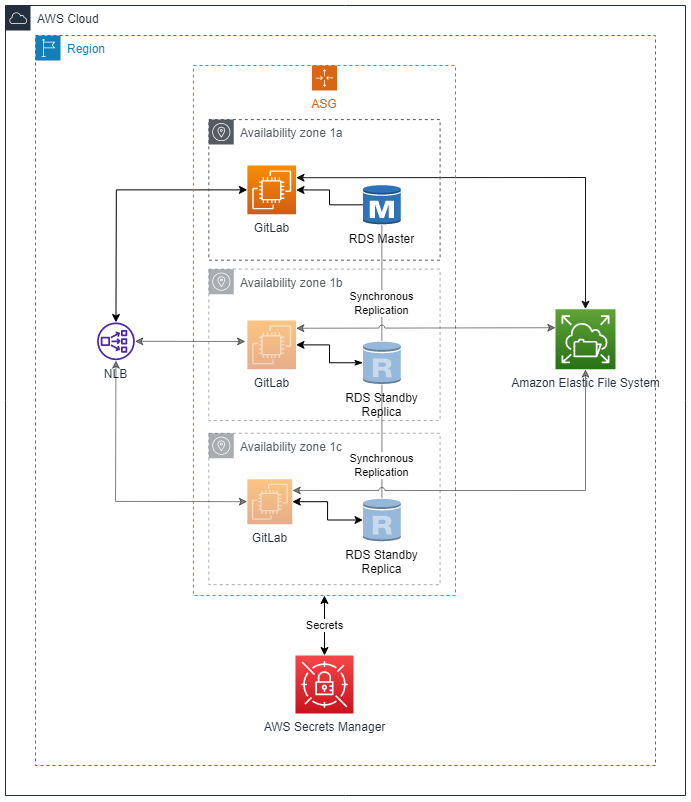
The purpose of this document is to outline the high-level design architecture for dockerized GitLab on AWS EC2 within Auto Scaling group. The following solution will be distributed across multiple AZ in a single Region to maintain High Availability.
Background
GitLab is a web-based platform that provides a complete DevOps solution for managing and tracking software development projects. It offers version control with collaboration tools (trough Git), continuous integration/continuous deployment (GitlabCI), and project management. It provides tools for code review, issue tracking, wikis, and merge requests, enabling efficient and streamlined software development processes. GitLab also integrates with various third-party services, making it a versatile and comprehensive solution for managing software projects. In the following solution we’ve decided to put GitLab on EC2 inside Auto scalling group with EFS as storage. GitLab database will be hosted on RDS.
Architecture diagram
Explanation
GitLab will be established on an account that has access to EKS (to set up GitLab Runners):
to ensure HA, it will be hosted on EC2 inside Auto scaling group (multi-AZ deployment);
data will be stored on EFS and (Postgres) RDS;
all secrets stored on AWS Secrets Manager.
Amazon S3 will store:
code artifacts;
cache;
tfstates.
Docker images will be stored on Amazon ECR
Signed with AWS Singer;
Scanned on-push by AWS Inspector.
Implementation Details
High Availability
The proposed solution ensures HA by using services that support multi-AZ deployments:
Auto scaling group will automatically redeploy GitLab instance on another AZ in case where current one go dark;
Data stored on:
automatically backed-up EFS with mount points deployed on multiple AZ;
RDS with multi-AZ deployments;
Artifacts stored on:
S3 which provides 99.99% durability;
Amazon ECR which stores images on S3;
Aurora vs RDS
What is Aurora?
Amazon Aurora is a fully managed MySQL- and PostgreSQL-compatible relational database built for the cloud that combines the performance and availability of traditional enterprise databases with the simplicity and cost-effectiveness of open source databases.
Additional Amazon Aurora features
Aurora Serverless
Aurora Serverless lets you run Aurora without having to guess how many compute nodes you need. It automatically starts and stops nodes to match the needs of your application. It scales up to meet a spike in demand and scales down when things are quiet. The data remains in the shared storage volume, independent of any scaling.
Aurora Multi-Master
In a multi-master cluster, all DB instances have read/write capability. The notions of a single read/write primary instance and multiple read-only Aurora Replicas don’t apply. There isn’t any failover when a writer DB instance becomes unavailable, because another writer DB instance is immediately available to take over the work of the failed instance.
Aurora Global Database
Aurora Global Database is designed for globally distributed applications, allowing a single Amazon Aurora database to span multiple AWS regions. It replicates your data with no impact on database performance, enables fast local reads with low latency in each region, and provides disaster recovery from region-wide outages.
Other features
What is RDS?
Amazon RDS (Relational Database Service) is a managed SQL database service a relational database in cloud which makes it easy to provision, setup, patching, and backups. It supports Aurora, MySQL, PostgreSQL, MariaDB, Microsoft SQL Server, and Oracle database engines.
Comprasion table
Characteristic | RDS | Aurora |
|---|---|---|
Architecture Design | Similar to installing database engine on Amazon EC2 manually, but leaving the provisioning and maintenance to AWS. RDS use Amazon EBS volumes for database and log storage. Reliability is achieved by enabling Multi-AZ feature on RDS instance and by replicating it synchronously to a standby replica in another Availability Zone. | Reliable and fault-tolerant by design. Database storage is separate from the instances. In Aurora, data has 6 copies (as 10 GB chunks distributed) to three Availability Zones. |
Performance | RDS uses SSDs storage for better I/O throughput performance. Two SSD backed storage options can be chosen from: General Purpose SSD optimized for high-performance OLTP applications, and Provisioned IOPS SSD for cost-effective general-purpose use. | Throughput performance is twice as fast as provided by PostgreSQL or five times as MySQL (running on similar hardware). Aurora’s performance is higher and more consistent. Aurora writes logs directly to the storage without keeping log buffers. The replication to the replicas is asynchronous and for only cached data. Because the replicas also share the same storage cluster, the replica lag is small and consistent over time. Due to its unique storage design, Aurora’s performance stays consistent when the load increases. |
Database Engine Support | MySQL, PostgreSQL, MariaDB, Microsoft SQL Server, and Oracle. | PostgreSQL, and MySQL. |
Availability and Durability | Achieved trough multi-AZ deployments with periodical backup to a standby replica in another Availability Zone. It requires to max out read replicas for Auroras level of durability. | Offers much higher availability and better durability, due to its unique storage model, and ability to perform continuous backups and restore with a very low RPO. In Aurora, data is durable by design. You always have multiple copies of your data, as Every Aurora cluster has six storage nodes, spread across three AZs. In RDS, you have to max out your read replicas for this level of durability. |
Resiliency | Aurora has fast recovery from failures. If a node crashes, Aurora can recover quickly. It can start new read replicas with minimal lag, and if the writer fails, another replica can be promoted to take over without waiting for the other nodes to reach consensus. All the shared state is in the data nodes, so failed nodes can be replaced almost immediately. | |
Storage | RDS storage autoscaling automatically scales storage capacity up to 64 TiB (except SQL Server’s 16 TiB) in response to growing database workloads, with zero downtime. With RDS Storage Auto Scaling, you simply set your desired maximum storage limit, and Auto Scaling takes care of the rest. | Aurora automatically increases storage from a minimum of 10 GB to a maximum of 128 TiB. This is done in increments of 10 GB without any impact on the database performance. You are not required to provide the storage in advance. |
Scaling | Allows you to scale the memory and compute resources up and down, to a maximum of 244 GiB of RAM and 32 vCPUs. Scaling operations can be done within a few clicks. | Same as RDS, but additionally provides Aurora Auto Scaling feature, which dynamically adjusts the number of Aurora Replicas provisioned for an Aurora DB cluster using single-master replication. It enables your Aurora DB cluster to handle sudden increases in connectivity or workload. When the connectivity or workload decreases, It removes unnecessary Aurora Replicas, so that you don’t pay for unused provisioned DB instances. |
Replication | RDS allows you to provision up to 5 replicas, and the process of replication is slower compared to Aurora. | Aurora allows you to provision up to 15 replicas, and the replication is done in milliseconds. As all replicas use shared storage volume, a new replica can serve queries almost immediately. It does not have to wait to replicate data from the other nodes. Aurora does some asynchronous cache replication between nodes, but nothing synchronous. This reduces the internode I/O, which means Aurora can have more replicas. |
Failover | Failover to read replica is done manually (promotion to a standalone database), which could lead to data loss. You can use Multi-AZ (Standby instance) feature for automatic failover, and to prevent downtime and data loss. | Failover to read replica is done automatically to prevent data loss. Failover time is faster on Aurora. |
Cluster Endpoints | There is a cluster endpoint which can be used to write queries. It is the DNS endpoint pointing to your current master db instance. During a failover, RDS routes this endpoint to the new master by a simple DNS change. However, for read replicas, you have to balance the load in your application using the instance endpoints. RDS does not provide a load balancer for read replicas. | Besides the cluster endpoint used to write queries, it also provides a reader endpoint acting as a load balancer for your read replicas. So you can use this endpoint for your read queries. In the case of a failover, one of the read replicas become master and is removed from this reader set. |
Backup | Creates and saves automated backups of your DB instance during the backup window of your DB instance. RDS creates a storage volume snapshot of your DB instance, backing up the entire DB instance and not just individual databases according to the backup retention period that you specify. If necessary, you can recover your database to any point in time during the backup retention period. While the snapshot is being taken, storage I/O may be interrupted while data is copied, affecting database performance. Backups are stored in Amazon S3. | Backs up your cluster volume automatically and retains restore data for the length of the backup retention period. Aurora backups are continuous and incremental, so you can quickly restore to any point within the backup retention period. No performance impact or interruption of database service occurs as backup data is being written. Backups are stored in Amazon S3. |
Pricing | Price vary depending on instance/deployment type. Starts with $0.019 per hour of db.t4g.micro instance. db.t4g.medium instance is for $0.074. https://aws.amazon.com/rds/postgresql/pricing/ | Price vary depending on instance/deployment type. Starts with $0.085 (+14.86%) per hour of db.t4g.medium instance (Frankfurt Region). https://aws.amazon.com/rds/postgresql/pricing/ |
Conclusion
Aurora is more feature-rich database storage service, but it comes at a much higher price. I believe RDS is sufficient for GitLab deployment despite requiring more administrative overhaul as Aurora has some processes automated.