HLD012 - Privileged Access Management
Revision | Date | Description |
|---|---|---|
| 27.08.2024 | Init document |
Introduction
This high-level design document provides an overview of the Attribute-based access control (ABAC).
Background
By definition, attribute-based access control (ABAC) is an authorization strategy that defines permissions based on attributes. In AWS, such attributes are tags. You can attach them to various AWS resources, i.e. IAM entities ( users/roles). You can create a single ABAC policy or small set of policies for your IAM principals. These policies can be designed to allow operations when the principal's tag matches the resource tag. ABAC significantly reduces policy management in environments that are growing rapidly.
For example, you can create two roles with team tag key and set values to green and yellow respectively. Then, you can use single policy to allow access when the role and the resources are tagged with the same value for team.
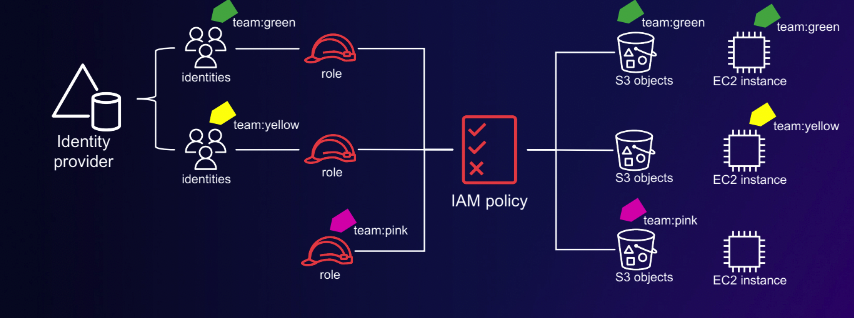
Example of ABAC structure. Please take note that in the above example, nobody has access to pink.
Key insights about ABAC
Identities and resources are given metadata attributes
Authorization based on principal and resource attributes
Attributes are part of the session
ABAC complements RBAC rather than replaces it
ABAC relies on mutable tags – key to success is tag governance
Adopt ABAC on a resource-by-resource basis
Consider human versus application scenarios – applications deployed
using pipelines can have built-in guardrails
When should you consider ABAC?
Single account that requires fine-grained controls
This might improve IAM Pathing of roles/resources (services must support it, tho)
Associate access with employee attributes
Fine-grained control within a specific service or set of resources
Similar IAM policies but with different, well-defined, resources scopes
RBAC
The most common approach to authorization model when working with IAM is to set up role-based access control (RBAC). In IAM, you implement it by creating different policies for different job functions, and then you attach the policies to identities such as (IAM) users/groups of users/roles. As a best practice, you grant the minimum permissions necessary for the job function. This is known as granting the least privilege. The main disadvantage of this approach is that when new resources are added, you must update policies to allow access to those resources.
Key insights about RBAC
Intuitive, especially for workforce
Unintended growth of nested groups (role creep)
Implementation
Overview
AWS
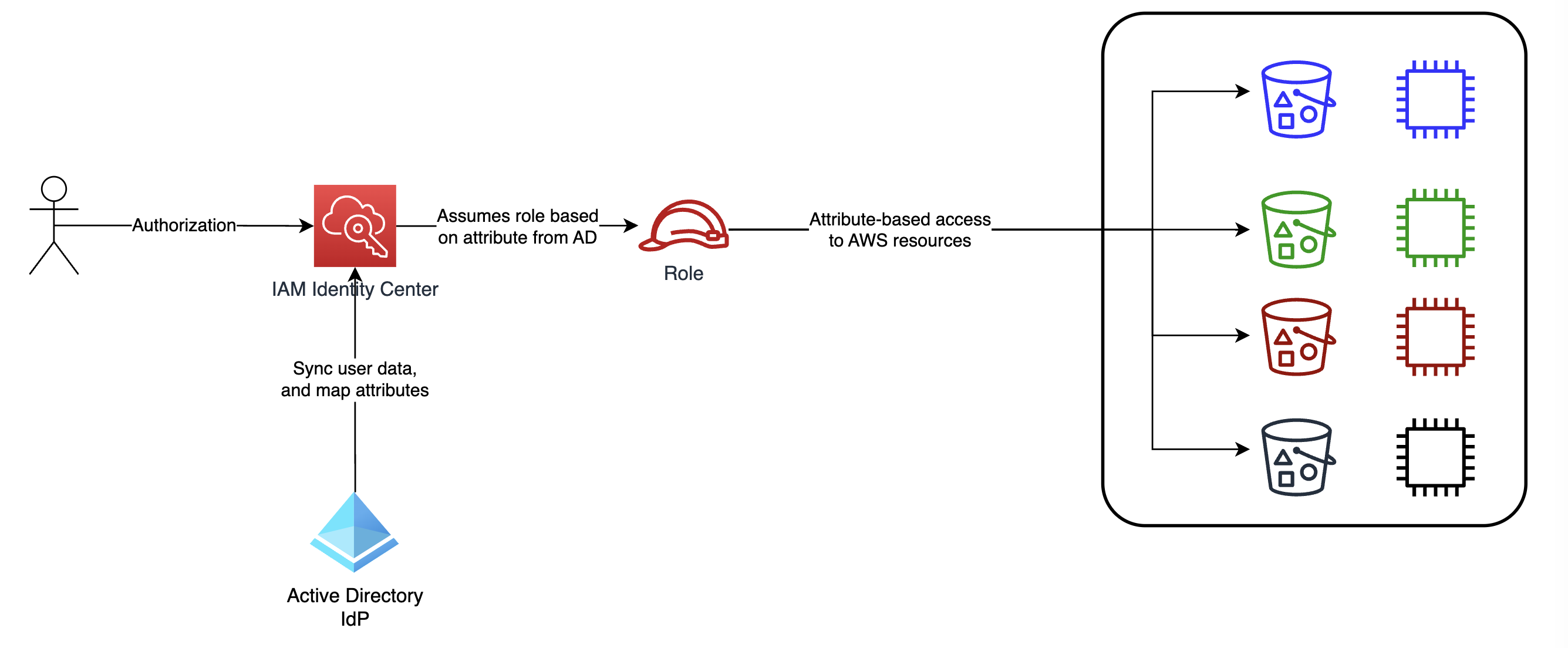
The whole concept is based on user attributes synched from Active Directory:
ExtAttribute12- in-project role nameDepartmentNumber- alphanumeric project acronymFullOrgName- name of tribe/organization unit
These three attributes will allow us to set up RBAC-ABAC autorization strategy as, after authentication, user assume role (RBAC) based on attributes from IdP (i.e. Active Directory). This way, the user gains access to resources with matching tags (ABAC). The following diagram provides a simplified overview of the implementation.
EKS
RBAC is the default authorization strategy for K8s. As EKS is a service managed by AWS with no access to control plane nodes. Therefore, we can not change cluster authorization mode to ABAC. Instead, we can authenticate to Kubernetes trough AWS IAM roles using aws-iam-authenticator which maps IAM Role ARNs to Roles inside K8s.
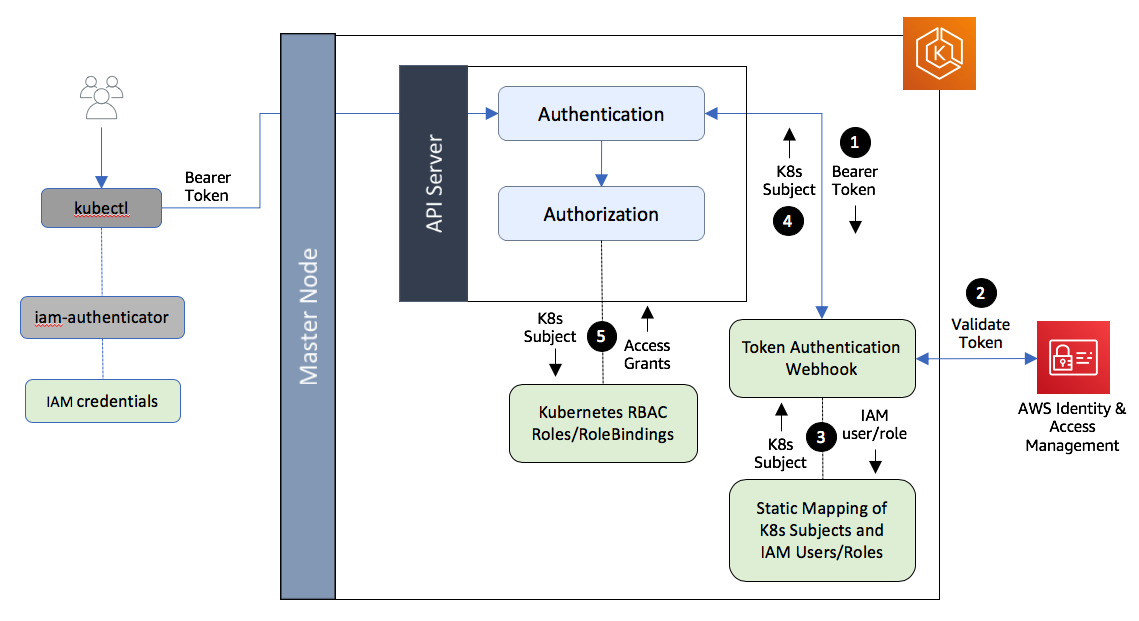
Authentication and Authorization of a client in an Amazon EKS cluster
In Kuberentes, RBAC API declares four top-level types:
Role - defined, within a namespace, contains rules that represent a set of permissions. These permissions are additive (no deny rules);
ClusterRole - same as Role, but cluster-wide;
RoleBinding - grants (within a namespace) the permissions defined in a Role to a user or group of users. It holds a list of subjects (users/groups/service accounts), and a reference to the role being granted;
ClusterRoleBinding - same as RoleBinding, but cluster-wide.
Users can interact with these resources as they would with any other API resource - via kubectl, API calls, etc.
Example
AWS Resources
In the following example, let’s assume we must grant access to project-related secrets, inside AWS Secrets Manager, for a DevOps from CINDYv3 team. Attributes have already been mapped from Active Directory using IAM Identity Center permission sets:
ExtAttribute12:DevOpsDepartmentNumber:CINDYv3FullOrgName:CINDY
We have to add policy that allows a user to assume any role in the account with the
example-name prefix. The role must also be tagged with the sameExtAttribute12,DepartmentNumber, andFullOrgNametags as the user:{ "Version": "2012-10-17", "Statement": [ { "Sid": "ExampleAssumeRole", "Effect": "Allow", "Action": "sts:AssumeRole", "Resource": "arn:aws:iam::123456789012:role/example-*", "Condition": { "StringEquals": { "iam:ResourceTag/ExtAttribute12": "${aws:PrincipalTag/ExtAttribute12}", "iam:ResourceTag/DepartmentNumber": "${aws:PrincipalTag/DepartmentNumber}", "iam:ResourceTag/FullOrgName": "${aws:PrincipalTag/FullOrgName}" } } } ] }Create a policy named
example-access-role. Add the following policy that allows principals to create, read, edit, and delete resources, but only when those resources are tagged with the same key-value pairs as the principal. When a principal creates a resource, they must addExtAttribute12,DepartmentNumber, andFullOrgNametags with values that match the principal's tags.{ "Version": "2012-10-17", "Statement": [ { "Sid": "AllActionsSecretsManagerSameProjectSameTeam", "Effect": "Allow", "Action": "secretsmanager:*", "Resource": "*", "Condition": { "StringEquals": { "iam:ResourceTag/ExtAttribute12": "${aws:PrincipalTag/ExtAttribute12}", "iam:ResourceTag/DepartmentNumber": "${aws:PrincipalTag/DepartmentNumber}", "iam:ResourceTag/FullOrgName": "${aws:PrincipalTag/FullOrgName}" }, "ForAllValues:StringEquals": { "aws:TagKeys": [ "ExtAttribute12", "DepartmentNumber", "FullOrgName" ] }, "StringEqualsIfExists": { "aws:RequestTag/ExtAttribute12": "${aws:PrincipalTag/ExtAttribute12}", "aws:RequestTag/DepartmentNumber": "${aws:PrincipalTag/DepartmentNumber}", "aws:RequestTag/FullOrgName": "${aws:PrincipalTag/FullOrgName}" } } }, { "Sid": "AllResourcesSecretsManagerNoTags", "Effect": "Allow", "Action": [ "secretsmanager:GetRandomPassword", "secretsmanager:ListSecrets" ], "Resource": "*" }, { "Sid": "ReadSecretsManagerSameDepartament", "Effect": "Allow", "Action": [ "secretsmanager:Describe*", "secretsmanager:Get*", "secretsmanager:List*" ], "Resource": "*", "Condition": { "StringEquals": { "aws:ResourceTag/DepartmentNumber": "${aws:PrincipalTag/DepartmentNumber}" } } }, { "Sid": "DenyUntagSecretsManagerReservedTags", "Effect": "Deny", "Action": "secretsmanager:UntagResource", "Resource": "*", "Condition": { "ForAnyValue:StringLike": { "aws:TagKeys": "example-*" } } }, { "Sid": "DenyPermissionsManagement", "Effect": "Deny", "Action": "secretsmanager:*Policy", "Resource": "*" } ] }The
AllActionsSecretsManagerSameProjectSameTeamstatement allows all of this service's actions on all related resources, but only if the resource tags match the principal tags. By adding"Action": "secretsmanager:*"to the policy, you make it more future-proof. If Secrets Manager adds a new API operation, you are not required to add that action to the statement. The statement implements ABAC using three condition blocks. The request is allowed only if all three blocks return true.The first condition block of this statement is truth if the specified tag keys are present on the resource, and their values match the principal's tags. This block returns false for mismatched tags, or for actions that don't support resource tagging. A list of actions that are not allowed by this block can be seen here. The following page shows that actions performed on the Secret resource type support the
secretsmanager:ResourceTag/tag-keycondition key. Some Secrets Manager actions don't support that resource type, includingGetRandomPasswordandListSecrets. You must create additional statements to allow those actions.The second condition block returns true if every tag key passed in the request is included in the specified list. This is done using
ForAllValues:StringEqualscondition operator. If no keys or a subset of the set of keys is passed, then the condition returns true. This allowssecretsmanager:Get*operations that do not allow passing tags in the request. If the requester includes a tag key that is not in the list, the condition returns false. Every tag key that is passed in the request must match a member of this list. For more information, see Using multiple keys and values.The third condition block returns true if the request supports passing tags, if all three of the tags are present, and if they match the principal tag values. This block also returns true if the request does not support passing tags. This is thanks to ...IfExists in the condition operator. The block returns false if there is no tag passed during an action that supports it, or if the tag keys and values don't match.
The
AllResourcesSecretsManagerNoTagsstatement allows the GetRandomPassword and ListSecrets actions that are not allowed by the first statement.The
ReadSecretsManagerSameTeamstatement allows read-only operations if the principal is tagged with the same access-team tag as the resource. This is allowed regardless of the project or cost-center tag.The
DenyUntagSecretsManagerReservedTagsstatement denies requests to remove tags with keys that begin withexample- from Secrets Manager. These tags are used to control access to resources, therefore removing tags might remove permissions.The
DenyPermissionsManagementstatement denies access to create, edit, or delete Secrets Manager resource-based policies. These policies could be used to change the permissions of the secret.
Attach policy from the previous step to a role associated with CINDYv3 DevOps. Make sure that role is tagged appropriately. Example tag values:
Job
ExtAttribute12 tag value
DepartmentNumber tag value
FullOrgName tag value
CINDYv3 DevOps
DevOps
CINDYv3
CINDY
CINDYv2 Developer
Developer
CINDYv2
CINDY
Accountant from Finance Dept.
Accountant
COST
Finance
DevOps from IT Department
DevOps
IT
IT_Dept
Remember to tag properly all ASM secrets that should be accessible for DevOps from CINDYv3.
ExtAttribute12:DevOpsDepartmentNumber:CINDYv3FullOrgName:CINDY
You are done. Every DevOps from CINDYv3 should have access to these secrets.
ABAC-RBAC in EKS
In the following example, I would like to demonstrate how to set up an IAM role for authentication and map it to a K8s role, which will allow API calls from IAM User. It will also cover how to allow a specific IAM user/role to manage a single namespace only, preventing them from interacting with other namespaces.
By default, whoever creates an EKS cluster, IAM User or IAM Role, will have full admin access to it. In order to add additional Users/Roles, w need to define a ConfigMap which is used for management of Users or IAM Roles for the Cluster.
Let’s have a look at base configuration for aws-auth ConfigMap, which allows worker Nodes with InstanceRole arn:aws:iam::111111111:role/worker-node-instance-role to join the EKS control plane:
To add another role.