HLD001 - AWS Landing Zone
Introduction
Purpose
The purpose of this document is to outline the high-level design architecture for AWS Landing Zone, to set up and manage a secure, scalable, and compliant AWS environment.
Changelog
Revision | Date | Description |
|---|---|---|
| 28.06.2024 | Initial document |
Related documents
Background
AWS Landing zone is a set of best practices recommended by AWS and its partners to create a secure and stable environment.
AWS Landing Zone contains:
Account structure
Network structure
Naming and tagging convention
Identity and access management
Security services
Monitoring and log aggregation
Audit and Compliance tools
Patching method
Backup solution
Architecture diagram
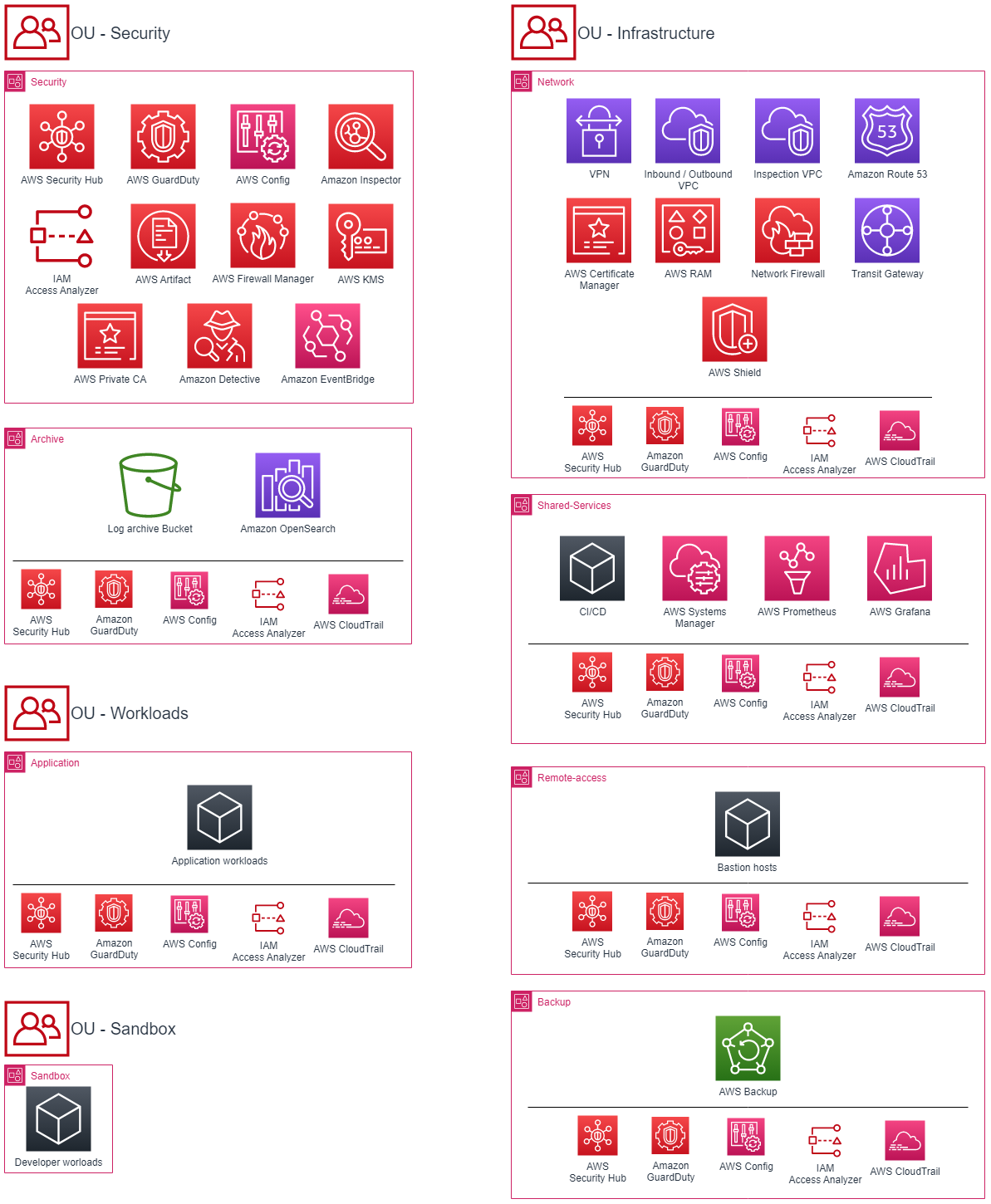
Explnation
This diagram represents the architecture of an AWS Landing Zone implementation. It shows the various components that make up the landing zone, including the core organizational units, accounts and all recommended services.
Implementation Details
Account & OU management methods
Account & OU structure must be maintained via central system (SSO, Cloud Shepard, etc.)
Organizational units
Security: highly restricted environment for security tools and auditing. The security OU is created by Control Tower and does not allow to add additional accounts.
Infrastructure: fundamental environment for all accounts which serves cloud infrastructure tools. The infrastructure OU can grow on customers demand, but requires high security restrictions and detailed monitoring.
Workloads: environment for all customer workloads. Accounts are constantly monitored by security tools to prevent security incidents.
Sandbox: separate environment for development, testing, and experimentation. The sandbox OU allows for innovation and experimentation without affecting the production environment and reduces the risk of unintended impacts.
Core Accounts
Security: AWS account used to scan and audit other AWS accounts within an AWS Organization. The security account is used to set up AWS security services and resource, enforce policies, provide cryptographic keys and notify about any security issue. Deployed Services:
AWS Security Hub: A centralized security management platform that provides a comprehensive view of security findings across AWS accounts and services.
AWS GuardDuty: A threat detection service that provides continuous security monitoring of AWS accounts and workloads.
AWS Config: A service that provides a complete inventory of your AWS resources and tracks changes to them.
Amazon Inspector: A security assessment service that analyzes applications for vulnerabilities and deviations from best practices.
IAM Access Analyzer: Analyzes resource policies in your AWS environment and identifies any that provide unintended public access.
AWS Firewall Manager: Makes it easier to manage firewalls (security groups) for your AWS resources by centralizing firewall rule management across accounts.
AWS KMS: Centralized key management to encrypt and decrypt data stored in AWS services.
Amazon Detective: Makes it easier to investigate, identify, and respond to security issues in AW.
Amazon Event Bridge: Allows to easily create and respond to security events within AWS environment.
Archive: AWS account used to aggregate logs generated by other AWS accounts including VPC flow logs, Cloudtrail logs or application logs. Deployed Services:
S3: Target bucket for VPC flow logs, CloudTrail logs, access logs and DNS logs.
Amazon OpenSearch: Search and analytics engine that makes it easy to search large amounts of logs in real-time and provides deep insights into that logs.
Network: AWS account designed for organizations with complex network topologies and security requirements, and provides advanced network isolation capabilities to help meet these requirements. This account is also used as only-point of connection with internet. Deployed Services:
AWS WAF: A service that provides security for web applications by allowing customers to create and manage rules that control to their applications.
Cloudfront: A content delivery network (CDN) that speeds up the delivery of static and dynamic web content, such as images, videos, and APIs.
Amazon Route 53: A highly available and scalable cloud Domain Name System (DNS) service that routes end-user to the right place online.
AWS Certificate Manager: A service that lets customers easily and securely manage SSL/TLS certificates for their websites and applications.
AWS RAM: A service that makes it easier to share AWS resources between multiple AWS accounts and to manage resource sharing at scale.
Transit Gateway: A service that makes it easier to manage network connections and route traffic between VPCs and on-premises data centers.
AWS Shield: A service that provides DDoS protection for web applications, helping to ensure their availability even in the face of DDoS attacks.
Inspection VPC: A VPC that inspects network traffic to and from other VPCs, helping to increase security and ensure compliance.
Inbound and outbound VPC: VPCs that control incoming and outgoing traffic, respectively, and help increase security and ensure compliance.
VPN: A VPN connection between On-premise and AWS, allowing for secure communication and data transfer between them. It can be either Site-on-site VPN or Direct Connect.
Shared-services: AWS account that provides centralization and sharing of common resources, such as CI/CD, monitoring, cloudformation stacksets, across multiple AWS accounts. This helps to simplify management and reduce the operational overhead of managing multiple AWS accounts. Deployed Services:
CI/CD: Any CI/CD tool set chosen by customer to provide deployment center of infrastructure and application components.
AWS Directory Services: Makes it easy to set up and run Microsoft Active Directory (AD) or Simple AD in the AWS Cloud. It can also be used to connect AWS with existing AD.
AWS Grafana: Provides a platform for creating and sharing interactive and reusable dashboards and alerts for monitoring AWS resources.
AWS Prometheus: An open-source monitoring solution for collecting and storing metrics data and alerting on anomalies.
Remote-access: AWS account that is used to connect and manage AWS resources in secure way. This includes all kind of bastion hosts, critix or AWS Workspaces. Deployed Services:
Bastion hosts
Backup: AWS account that is used to store backups generated within our environment. Deployed Services:
AWS Backup: A fully managed backup service that makes it easy to centralize, automate, and manage backups of AWS resources.
Expected Outcomes
Secure setup of AWS environment.
Consistent governance and enforcement of security and compliance policies.
Improved visibility and control over user access.
Regular monitoring and reporting on the state of the environment.