FluxCD
Revision | Date | Description |
|---|---|---|
| 24.07.2024 | Init Changelog |
Introduction
Flux is a tool for keeping Kubernetes clusters in sync with sources of configuration (like Git repositories), and automating updates to configuration when there is new code to deploy. Flux is built from the ground up to use Kubernetes' API extension system, and to integrate with Prometheus and other core components of the Kubernetes ecosystem. Flux supports multi-tenancy and support for syncing an arbitrary number of Git repositories.
Flux Works Well With
Flux very naturally integrates with these pieces* of best-practice Open Source software (from the CNCF Landscape and elsewhere). Click on the logo to see how to set it up with Flux.
Flux in Short
🤝 Flux provides GitOps for both apps and infrastructure
Flux and Flagger deploy apps with canaries, feature flags, and A/B rollouts. Flux can also manage any Kubernetes resource. Infrastructure and workload dependency management is built in.
🤖 Just push to Git and Flux does the rest
Flux enables application deployment (CD) and (with the help of Flagger) progressive delivery (PD) through automatic reconciliation. Flux can even push back to Git for you with automated container image updates to Git (image scanning and patching).
🔩 Flux works with your existing tools
Flux works with your Git providers (GitHub, GitLab, Bitbucket, can even use s3-compatible buckets as a source), all major container registries, fully integrates with OCI and all CI workflow providers
🔒 Flux is designed with security in mind
Pull vs. Push, least amount of privileges, adherence to Kubernetes security policies and tight integration with security tools and best-practices. Read more about our security considerations.
☸️ Flux works with any Kubernetes and all common Kubernetes tooling
Kustomize, Helm, RBAC, and policy-driven validation (OPA, Kyverno, admission controllers) so it simply falls into place.
🤹 Flux does Multi-Tenancy (and “Multi-everything”)
Flux uses true Kubernetes RBAC via impersonation and supports multiple Git repositories. Multi-cluster infrastructure and apps work out of the box with Cluster API: Flux can use one Kubernetes cluster to manage apps in either the same or other clusters, spin up additional clusters themselves, and manage clusters including lifecycle and fleets.
✨ Dashboards love Flux
No matter if you use one of the Flux UIs or a hosted cloud offering from your cloud vendor, Flux has a thriving ecosystem of integrations and products built on top of it and all have great dashboards for you.
📞 Flux alerts and notifies
Flux provides health assessments, alerting to external systems, and external events handling. Just “git push”, and get notified on Slack and other chat systems.
👍 Users trust Flux
Flux is a CNCF Graduated project and was categorised as “Adopt” on the CNCF CI/CD Tech Radar (alongside Helm).
💖 Flux has a lovely community that is very easy to work with!
We welcome contributors of any kind. The components of Flux are on Kubernetes core controller-runtime, so anyone can contribute and its functionality can be extended very easily.
Who is Flux for?
Flux helps
cluster operators who automate provision and configuration of clusters;
platform engineers who build continuous delivery for developer teams;
app developers who rely on continuous delivery to get their code live.
What can I do with Flux?
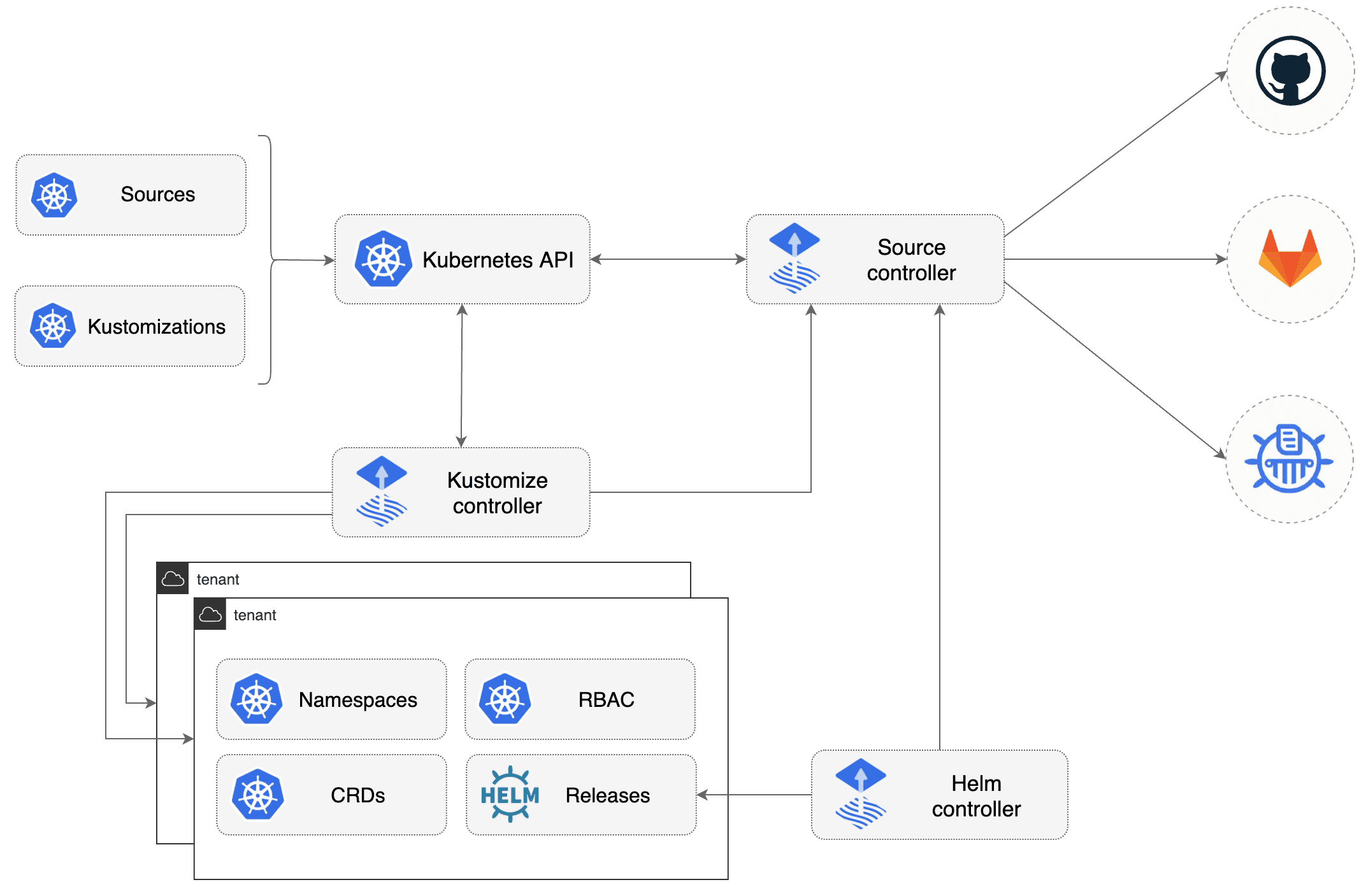
Flux is based on a set of Kubernetes API extensions (“custom resources”), which control how git repositories and other sources of configuration are applied into the cluster (“synced”). For example, you create a GitRepository object to mirror configuration from a Git repository, then a Kustomization object to sync that configuration. Flux works with Kubernetes’ role-based access control (RBAC), so you can lock down what any particular sync can change. It can send notifications to Slack and other like systems when configuration is synced and ready, and receive webhooks to tell it when to sync. The flux command-line tool is a convenient way to bootstrap the system in a cluster, and to access the custom resources that make up the API.
More detail on what’s in Flux
Features:
Source configuration from Git and Helm repositories, and S3-compatible buckets (e.g., Minio)
Kustomize and Helm support
Event-triggered and periodic reconciliation
Integration with Kubernetes RBAC
Health assessment (clusters and workloads)
Dependency management (infrastructure and workloads)
Alerting to external systems (webhook senders)
External events handling (webhook receivers)
Automated container image updates to Git (image scanning and patching)
Policy-driven validation (OPA, Kyverno, admission controllers)
Seamless integration with Git providers (GitHub, GitLab, Bitbucket)
Interoperability with workflow providers (GitHub Actions, Tekton, Argo)
Interoperability with Cluster API (CAPI) providers
What is the GitOps Toolkit?
Flux is constructed with the GitOps Toolkit components, which is a set of
specialized tools and Flux Controllers
composable APIs
reusable Go packages for GitOps under the fluxcd GitHub organisation for building Continuous Delivery on top of Kubernetes. The GitOps Toolkit can be used individually by platform engineers who want to make their own continuous delivery system, and have requirements not covered by Flux.