Disaster Recovery
Revision | Date | Description |
|---|---|---|
| 27.08.2024 | Init document |
Introduction
When formulating disaster recovery (DR) plans for Amazon EKS, organizations frequently adopt several standard methodologies. These approaches are generally customized according to the organization's Recovery Time Objective (RTO) and Recovery Point Objective (RPO) goals. RTO is the maximum duration that your application can afford to be down, while RPO is the utmost quantity of data loss that your application can withstand.
Backup and Restore Strategy
Backup
EKS Configuration Backup: You can back up the EKS configuration using eksctl or the AWS Management Console. The configuration includes details about the EKS cluster setup, the worker nodes configuration, Kubernetes objects (like Deployments, Services, ConfigMaps, etc.), and any other cluster-wide configuration.
Application Data Backup: You can use AWS Backup, a fully managed backup service in AWS to centralize and automate data backup across AWS services. You can also use Volume Snapshot for EBS volumes which can be used to back up the state of the Persistent Volumes attached to your pods. For databases, you could use the snapshot feature available in Amazon RDS or Amazon DynamoDB.
Restore
In the event of a disaster, you could restore the EKS cluster using the backed-up configuration. Using the eksctl command or the AWS Management Console, you can recreate the cluster with the same configuration.
For application data, you could use AWS Backup to restore the data backups to a new EKS cluster. For EBS volumes, you could create new volumes from the volume snapshots and attach them to the pods in the new cluster.
Pros
Simple to implement and manage.
Backups can be automated, reducing manual intervention.
Cons
Restoring from backup may result in downtime.
There may be data loss for data changes after the last backup.
Cost
The cost of storage for backups (e.g., S3 storage costs), plus the cost of data transfer when a restore operation is performed. Backup and restore is often easier and less expensive to implement, but it may result in longer recovery times and data loss
It's important to recognize that the "AWS Backup" service has its limitations - it's capable of backing up AWS resources but falls short when it comes to backing up an EKS cluster and the Kubernetes resources within that cluster.
For backing up EKS clusters, there is an alternative provided by VMware known as Velero. This third-party tool has the ability to back up EKS clusters.
Example of EKS backup using Velero

Velero is composed of two key parts:
A server pod running on your Amazon EKS cluster.
A local command-line interface (CLI) client.
When a backup command is executed against an Amazon EKS cluster, Velero undertakes the backup of cluster resources as follows:
The Velero CLI communicates with the Kubernetes API server to generate a new Backup Custom Resource Definition (CRD).
The backup controller then:
Evaluates the specifications of the Backup CRD, such as any defined filters.
Interacts with the API server to compile the resources requiring backup.
Compresses the resulting Kubernetes objects into a .tar file and stores it on Amazon S3.
When the restore command is executed:
The Velero CLI interfaces with the Kubernetes API server to generate a Restore CRD from an existing backup.
The restore controller then:
Validates the specifications of the Restore CRD.
Contacts Amazon S3 to retrieve the backup files.
Begins the restore operation.
Furthermore, Velero can also manage the backup and restoration of any in-scope persistent volumes.
Backup and restore your Amazon EKS cluster resources using Velero
Multi-Region Strategy
Active-Active
In an Active-Active strategy, you would run your application in multiple AWS regions simultaneously. Each region would have its own EKS cluster.
The application data would need to be replicated across regions. Amazon RDS Multi-Region replication, Amazon DynamoDB global tables, and Amazon S3 Cross-Region replication can be used for this purpose.
Route 53, AWS’s scalable and highly available Domain Name System (DNS) can be used to distribute traffic among regions. Using health checks, Route 53 can also route traffic away from unhealthy regions, providing automatic failover capability.
Active-Passive
In an Active-Passive strategy, you would run your application in one region (the active region), and have a backup EKS cluster in another region (the passive region).
Similar to the active-active strategy, the application data would need to be replicated from the active to the passive region.
In the event of a disaster in the active region, you could manually switch to using the EKS cluster in the passive region. Route 53 DNS failover can be used to redirect the traffic to the passive region.
Pros (Active-Active):
Minimizes downtime, as traffic can be instantly routed to another region if a disaster occurs.
Can serve users from a region closer to them, improving latency.
Pros (Active-Passive):
Reduces the impact of a disaster in the primary region.
Lower cost than active-active as the passive region's resources can be scaled down when not in use.
Cons (Active-Active):
More complex to manage.
Higher cost due to running full applications in multiple regions simultaneously.
Cons (Active-Passive):
There may be some downtime while switching from the active to the passive region.
This may result in data loss if not all data has been replicated to the passive region when disaster strikes.
Cost
The cost of running EKS and associated resources in multiple regions. Also, consider data transfer costs for replication between regions. Multi-region strategies offer faster recovery and minimize data loss, but they are more complex and can increase costs due to running resources in multiple regions.
Example of multi-region cluster
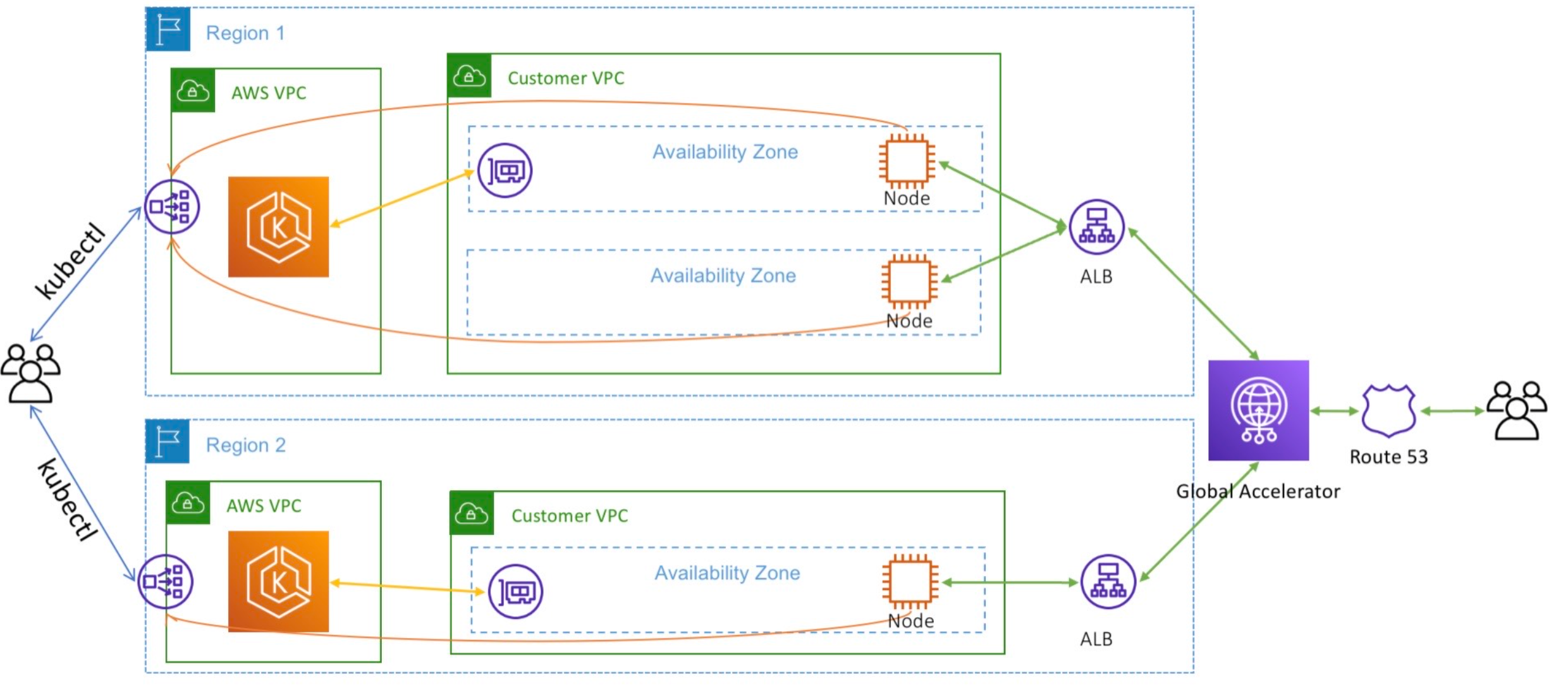
Amazon EKS is accessible across all 24 AWS Regions, thereby providing you the ability to manage a unified, worldwide infrastructure powered by Kubernetes using GitOps and Infrastructure-as-Code tools. You can establish private network connections between Amazon EKS clusters across various AWS Regions using inter-region VPC peering, and devise a data replication plan using AWS Database and Storage services that aligns with your recovery point (RPO) and recovery time ( RTO) objectives. Moreover, the routing functionalities of AWS Global Accelerator simplify the task of distributing traffic across multiple AWS Regions, whether your requirements involve active-failover, active-active, or more intricate scenarios.
In the given scenario, a sample application was deployed across two separate EKS clusters, each located in a distinct AWS Region. The AWS Load Balancer Controller was installed in both clusters, and the application was made accessible in both regions using an Application Load Balancer (ALB). Subsequently, these ALBs were set up as endpoints within AWS Global Accelerator. One region was defined as the primary, while the other was assigned as a failover.
Operating a multi-regional stateless application using Amazon EKS