EC2
Revision | Date | Description |
|---|---|---|
| 26.08.2024 | Init document |
Introduction
Amazon EC2, a service offered by Amazon Web Services (AWS), offers scalable computing power in the cloud. By utilizing Amazon EC2, you can avoid the upfront investment in hardware, allowing for quicker application development and deployment. With Amazon EC2, you have the flexibility to launch virtual servers according to your specific requirements, manage security and networking settings, and handle storage management. This service also enables you to easily adjust your resources to accommodate changing demands or sudden surges in popularity, reducing the need for accurate traffic predictions.
Features of EC2
Instances refer to virtual computing environments.
Amazon Machine Images (AMIs) are preconfigured templates for instance, containing the necessary components such as the operating system and additional software.
Instance types offer various configurations of CPU, memory, storage, and networking capacity for instances.
To securely access instances, key pairs are used, with AWS storing the public key and the user storing the private key.
Storage volumes for temporary data that are deleted when you stop, hibernate, or terminate your instance, known as instance store volumes
Persistent storage volumes for data are provided by Amazon Elastic Block Store (Amazon EBS) in the form of Amazon EBS volumes.
Regions and Availability Zones are multiple physical locations where resources like instances and Amazon EBS volumes are located.
Security groups act as firewalls, allowing the specification of protocols, ports, and source IP ranges that can access instances.
Elastic IP addresses are static IPv4 addresses used for dynamic cloud computing
Tags, known as metadata, can be created and assigned to Amazon EC2 resources.
Virtual private clouds (VPCs) are virtual networks that can be created to isolate resources within the AWS Cloud and optionally connect to an external network.
Scale Seamlessly with Amazon EC2 Auto Scaling which allows you to automatically scale your Amazon EC2 capacity up or down according to conditions you define. You can use the dynamic and predictive scaling policies within EC2 Auto Scaling to add or remove EC2 instances. Predictive scaling uses machine learning to proactively allocate instances based on anticipated demand, and dynamic scaling allows you to scale compute based on defined metrics. With EC2 Auto Scaling, you can ensure that the number of Amazon EC2 instances you’re using scales up seamlessly during demand spikes to maintain performance, and scales down automatically during demand lulls to minimize costs.
Pause and Resume Your Instances, You can hibernate your Amazon EC2 instances backed by Amazon EBS, and resume them from this state at a later time
Supported operating systems
Amazon Web Services (AWS) Elastic Compute Cloud (EC2) supports a variety of operating systems.
Linux-based OS:
Amazon Linux 2
Ubuntu
Red Hat Enterprise Linux (RHEL)
SUSE Linux Enterprise Server (SLES)
CentOS
macOS
Debian
Fedora
openSUSE
Windows-based OS:
Windows Server 2019
Windows Server 2016
Windows Server 2012 R2
Others:
FreeBSD
VM Import/Export to import your own VM images.
Generally, we can divide instances into 3 categories:
Linux Instances
Windows Instances
Nitro enclaves - is a feature within Amazon EC2 that enables the creation of isolated execution environments known as enclaves. These enclaves are independent, fortified, and highly restricted virtual machines. They possess exclusively secure local socket connectivity with their parent EC2 instances. Enclaves lack persistent storage, interactive accessibility, or external networking capabilities. SSH access to an enclave is prohibited, and the data and applications within it remain inaccessible to the parent instance's processes, applications, or users (including root or admin privileges). By utilizing Nitro Enclaves, you can safeguard your most sensitive data, such as personally identifiable information (PII), along with your data processing applications.
Instance types
Amazon EC2 offers a diverse range of instance types, each of which is optimized for specific application needs. These instance types combine different proportions of CPU, memory, storage, and networking capacity, offering you the versatility to pick the perfect resource mix for your tasks. For each instance type, there are various instance sizes, thus enabling you to adjust your resource scale to fit the demands of your intended workload.
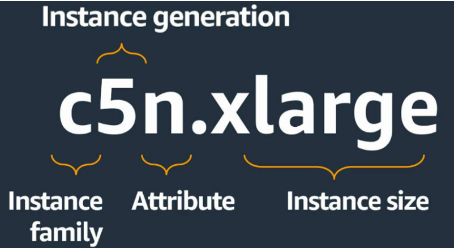
Generally, we can divide instance types to 5 categories:
General purpose instances provide a balance of compute, memory, and networking resources, and can be used for a wide range of workloads.
Compute optimized instances are ideal for compute-bound applications that benefit from high-performance processors.
Memory optimized instances are designed to deliver fast performance for workloads that process large data sets in memory.
Storage optimized instances are designed for workloads that require high, sequential read and write access to very large data sets on local storage. They are optimized to deliver tens of thousands of low-latency, random I/O operations per second (IOPS) to applications.
Accelerated computing instances use hardware accelerators, or co-processors, to perform some functions, such as floating point number calculations, graphics processing, or data pattern matching, more efficiently than is possible in software running on CPUs.